Descriptor export from phone wallets (Cove, Nunchuk, BlueWallet and others)
Copy the wallet descriptor out of a phone wallet, send it to the SeedHammer II with NFC Tools on the same phone, and know which exports the machine accepts.
A phone wallet already holds the wallet descriptor, and the same phone can send it to the SH II with NFC Tools. This page shows which export to take from Nunchuk, Cove, BlueWallet, Bitcoin Keeper, Envoy and the Blockstream app, how to get it onto the clipboard, and what the machine shows when it arrives. Written for stock firmware v1.4.3. You need the machine, the phone with the wallet, and NFC Tools on that phone.
Seed words are typed on the machine only. They never pass through a phone, a computer or a chat assistant. Use only the exports named on this page: some wallet backups contain seed words, for example BlueWallet's "Export/Backup" for a vault that holds keys. To engrave a seed, see Enter a seed on the touchscreen.
A descriptor is not a secret: it cannot spend. It reveals every address of the wallet, and with them the balance and history. Keep it out of email, chat and cloud storage.
What you need
- The SH II on stock firmware v1.4.3 ("Firmware: v1.4.3" at the bottom right of "Backup Wallet"), on its power supply.
- NFC Tools on the phone that holds the wallet. The full NFC Tools steps are on Send a descriptor with NFC Tools.
- A wallet the machine engraves: single-sig, or a sorted multisig as P2WSH, P2SH-P2WSH or P2SH. Taproot multisig, miniscript and unsorted
multigive "Unknown format".
Pick the export
Take the export that holds a descriptor with each key's origin: Nunchuk Descriptor, Cove Export Xpub, BlueWallet Export Coordination Setup (vaults), Keeper Wallet configuration file, Envoy Show Descriptor, Blockstream Output Descriptors. Only BlueWallet's vault text gives the machine a title among these apps. The overview of every app's result is on the capability sheet.
Do not send a bare key: BlueWallet Show Wallet XPUB, Keeper Show xPub, Blockstream Extended Public Keys. An xpub is read as "Legacy (P2PKH)" whatever the wallet is, and no bare key keeps its fingerprint and path on the plate (Prepare the text).
Export from the wallet
The labels are those of Nunchuk 2.9.0 for Android, Cove 1.4.0, BlueWallet 8.0.3, Bitcoin Keeper 2.5.13, Envoy 2.3.5 and the Blockstream app 5.7.0. All but Nunchuk's are taken from the apps' source code and are not yet checked on a phone.
Nunchuk
- Open the wallet, tap the three-dot menu at the top right, then View wallet config.
- On "Wallet config", tap the three-dot menu again, then Export wallet configuration.
- Under "Select the export format", tap Descriptor, then Save file.
- Nunchuk saves
<wallet name>_descriptor.txtto the Downloads folder: one line, the receive descriptor (/0/*) with every key origin and a checksum, no line break at the end. - Open the file in a file manager or text editor, select all and copy. Nunchuk has no copy button for it. Check: whether Share file offers Copy on a phone.
- Multisig only: Coldcard, then Export via file (advanced), saves
<wallet id>_coldcard_export.txt, the same descriptor with/<0;1>/*, which covers the change addresses too. The machine takes either file. Coldcard, then Export via NFC, writes that descriptor as a Text record to a tag held to the phone, so it may reach the SH II without NFC Tools. Check: on a phone and a machine. - Do not use BSMS ("Unknown format"). Do not use the Descriptor on the back-up screen either: Do it now in the wallet's banner ("Please back up your wallet configuration.") should open it. Check: that screen on a phone. In the source its keys end in
/*, which describes other addresses than the wallet's. - iPhone: the iOS source is not public. Expect the same "Export wallet configuration" sheet, and copy the saved file from the Files app. Check: the iOS labels.
Cove (single-sig only)
- Open the wallet, tap the ellipsis menu, then Export Xpub. Check: the menu's name on Android.
- Tap QR Code. On the sheet "Export Xpub" ("Public descriptor for watch-only wallet"), tap the copy icon. Cove shows "Copied".
- Despite the name, the clipboard holds a full descriptor on one line, for example
wpkh([73c5da0a/84h/0h/0h]xpub.../<0;1>/*)#.... If it ever shows two lines, delete the second line and the line break before it.
BlueWallet
- Open the vault and tap the dots button at the upper-right corner to open its details.
- Tap Export Coordination Setup. Long-press the text and copy it, or tap Share..., then Save..., and copy the text from the saved
.txtfile, which is named after the vault. Check: the long-press on iOS and Android, and the file name.
- The text has several lines:
Name:,Policy:,Derivation:,Format:, then onefingerprint: keyline per cosigner. Send it whole, line breaks included. - A wrapped segwit vault prints
Format: P2SH-P2WSH, which the machine refuses. In the NFC Tools text field, change it toFormat: P2WSH-P2SHbefore writing. Check: on a machine. - A cosigner on its own path appears only in a
# derivation:comment. The machine skips comments and gives that key the commonDerivation:path, so its engraved origin is wrong. Do not engrave such a vault from this export. - Single-sig wallets have no export that keeps fingerprint, path and child path. Show Wallet XPUB gives a bare key (Pick the export); BlueWallet's own text says a zpub, ypub or xpub "will not keep the path or fingerprint". A Taproot wallet shows
tr([fingerprint/86'/0'/0']xpub...)with no child path after the key. The v1.4.3 source reads it as "Taproot (P2TR)", but do not engrave it: whether a wallet restored from it finds the BlueWallet addresses is not checked. For a BlueWallet single-sig wallet, the seed plate is the backup (Enter a seed on the touchscreen).
Bitcoin Keeper
- Open the vault and tap the settings icon in its header. "Wallet Settings" opens.
- Tap Wallet configuration file, then Show QR in "Export Wallet Configuration".
- On "Wallet Configuration", tap the descriptor text box and choose Copy in the share sheet. Check: that the share sheet offers Copy.
- The text is one descriptor with
/<0;1>/*and every key origin. Inheritance, emergency and timelock vaults are miniscript and give "Unknown format". - On iPhone, the NFC option writes the descriptor as a Text record to a tag and may reach the SH II directly. Check: on a machine. On Android, NFC makes the phone act as a Type 4 tag, and the SH II reads only Type 2 and Type 5 tags, so expect nothing: use NFC Tools. Check: on a machine.
Envoy and the Blockstream app (single-sig)
- Envoy: open the account, tap the more menu at the top right, then Show Descriptor. Choose Segwit in the dropdown (Envoy preselects Taproot when Taproot is on in its settings) and tap Copy. Envoy shows "Descriptor copied to clipboard." The text is the receive descriptor
wpkh([fingerprint/84'/0'/0']xpub.../0/*)#.... Taproot reaches "Engrave Descriptor" as "Taproot (P2TR)" in the v1.4.3 source. Check: on a machine, and a restore from that plate. - Blockstream app: open the wallet settings and tap Watch-only. Under Singlesig, tap the copy button on the account's Output Descriptors row. Check: the way to the wallet settings on iOS and Android. The copied text has two lines, receive (
/0/*) and change (/1/*), and gives "Unknown format" as it is. After pasting into NFC Tools, delete the second line and the line break before it.
Hardware signers
Jade, Keystone, Passport Core, SeedSigner and Krux cannot send anything to the SH II. Type each signer's seed words on the machine (Enter a seed on the touchscreen) and send the descriptor from the phone coordinator with NFC Tools.
- A multisig setup exported by the signer itself is Coldcard-style text: P2WSH parses with the wallet name as title, but Jade and Passport Core write wrapped segwit as
Format: P2SH-P2WSH, which fails. Their QR codes are animated UR codes, not text a phone can copy; their files (Keystone microSD, Passport Core "Export via microSD", Passport Prime "Export Multisig Config") must first reach the phone, for example through a computer. Passport Prime is reported to have NFC; whether it can send this file to the SH II directly is not known. Check: on a Prime and a machine. - Jade Plus: Options, USB Storage, Export Xpub writes
jade-xpub.txt, a single-sig receive descriptor (/0/*) that parses. Move it to the phone through a computer. - BitBox02: in BitBoxApp, Account info, View account details, then the copy button under Descriptor. That single-sig descriptor parses. Trezor Suite (Show public key) and Ledger Wallet (Advanced) show only a bare key: do not send it. A Trezor Taproot account shows a descriptor instead, which the v1.4.3 source reads as "Taproot (P2TR)". Check: on a machine. For a multisig with any of these signers, take the descriptor from the coordinator.
- Unchained: Sparrow's Unchained Caravan Multisig export and the Coldcard Unchained export are JSON without a descriptor field. As text they give "Unknown format", and a Coldcard sends them as a record the machine skips. If the wallet is also set up in Sparrow, export from there (Sparrow and Specter). Check: what Unchained's own platform exports, and whether the machine takes it.
- Coldcard Mk4 and Q send over NFC themselves: Send a descriptor from Coldcard Mk4 or Q.
- Any other coordinator works when its export is one of the forms on NFC Tools transfer.
Send it from the same phone
The SH II has no descriptor menu. On "Backup Wallet" it listens for NFC and opens "Engrave Descriptor" by itself when a descriptor arrives.
- Copy the export in the wallet, then open NFC Tools and paste it into one Text record. Prepare it as on Prepare the text: nothing before or after a one-line descriptor.
- Keep the line breaks inside BlueWallet text: the field must show one entry per line. Check: NFC Tools on Android keeps them.
- On an iPhone, do not switch back to the wallet after tapping Write: leaving NFC Tools ends the write.
- Tap Write and hold the phone over the panel right of the display: Write the descriptor with NFC Tools.
What the machine shows
- "Scanning..." while data arrives, then "Engrave Descriptor" with "Type" ("Singlesig" or for example "2-of-3 multisig") and "Script" (for example "Segwit (P2WSH)", "Nested Segwit (P2SH-P2WSH)", "Segwit (P2WPKH)").
- "Title" appears above them only for Coldcard or BlueWallet text with a
Name:line (BlueWallet vault text, a signer's multisig file, an old Nunchuk Coldcard file) or JSON with a label. In the v1.4.3 source the title is shown on "Engrave Descriptor" and not engraved. Check: on a plate. See Titles. - Compare Type and Script with the wallet. Nunchuk shows them on "Wallet config", for example "2/3 Multisig" and "Native segwit". If they differ, tap the back button (top of the right edge).
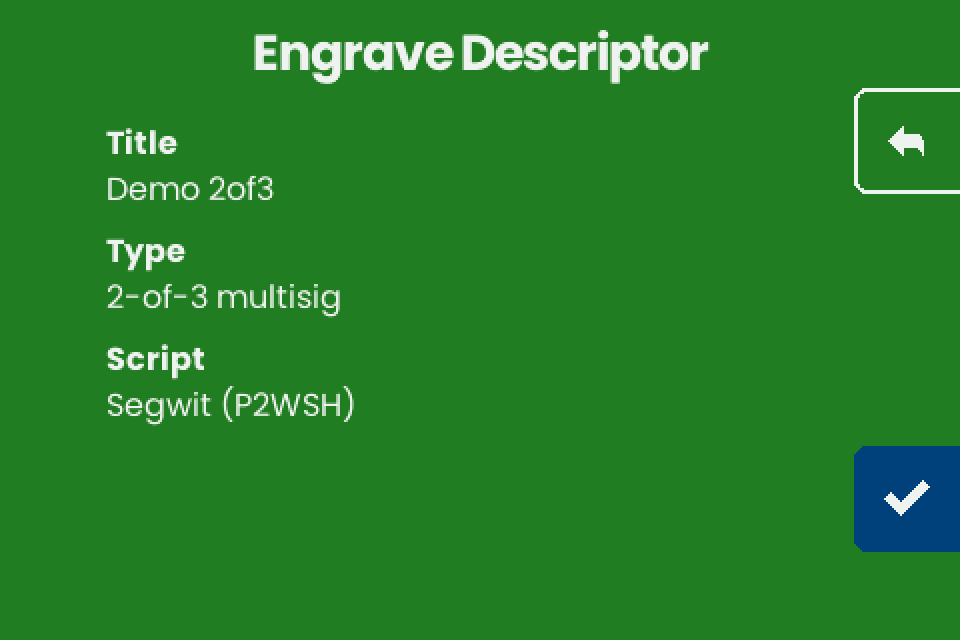
- Tap the checkmark (bottom of the right edge). "Engrave" lists under "Choose engraving" only the layouts that fit. The firmware's own check gives the demo 2-of-3 "TEXT ONLY" and "QR ONLY" in each form these apps export: a plain descriptor with
/0/*or/<0;1>/*, or Coldcard-style text. A single-sig descriptor also gets "TEXT + QR"; a 3-of-5 gets "Too Large". See What fits on a plate. - The plate does not repeat the export character for character:
hfor',xpubforZpub, the machine's own checksum, and no/<0;1>/*from BlueWallet text. See Why the plate differs. Check: with Nunchuk's export, which uses'.
If it does not work
"Unknown format" for a wallet export. By app: a Nunchuk BSMS file (export Descriptor instead); Blockstream receive and change descriptors on two lines (delete the second); a BlueWallet wrapped vault (change the line to Format: P2WSH-P2SH); BlueWallet text that arrived without its line breaks (the NFC Tools field must show one entry per line). A Keeper inheritance, emergency or timelock vault, or a Nunchuk taproot multisig or miniscript wallet, cannot be engraved on stock firmware v1.4.3: engrave the seeds and keep the descriptor another way. If the export itself is right, look at the transfer: a space or line break before or after the paste, Windows line ends in a saved text file, or a "URL / URI" record. See NFC Tools transfer.
"Script" shows "Legacy (P2PKH)" for a segwit wallet. A bare xpub was sent, for example from Keeper Show xPub. Tap back and send a descriptor export.
No "Title" line. Expected for a plain descriptor, which is what Nunchuk, Cove, Keeper, Envoy and the Blockstream app export. A title comes only from text with a Name: line or JSON with a label (What the machine shows).
The wallet's own NFC button does nothing on the machine. Keeper on Android acts as a Type 4 tag, and the SH II reads only Type 2 and Type 5 tags. Use NFC Tools. Check: on a machine.
For a phone that never finishes the write, "Scan error" or an NFC Tools error after the write, see NFC Tools transfer and Troubleshooting.