Send a descriptor from Coldcard Mk4 or Q over NFC
Tap a Coldcard Mk4 or Q on the SeedHammer II to send a wallet descriptor, choose the Coldcard export the machine reads, and fix a failed transfer.
A Coldcard Mk4 or Q sends a wallet descriptor to the SH II over NFC with no phone in between: tap it on the machine at "Backup Wallet" and "Engrave Descriptor" opens. Written for stock firmware v1.4.3, Coldcard Mk4 5.6.3 and Q 1.5.3Q.
A Coldcard can push seed words over NFC and the machine accepts them, so type seeds on the machine instead, as in Enter a seed on the touchscreen. A descriptor is not a secret, but it reveals every address of the wallet.
What you need
- The SH II on stock firmware v1.4.3, showing "Backup Wallet" (the only screen that listens) with "Firmware: v1.4.3" at the bottom right.
- A Coldcard Mk4, out of its bumper sleeve, or a Q, with NFC on (off by default): Settings > Hardware On/Off > NFC Sharing > Enable NFC.
Choose the export
| Coldcard export | Result | Machine shows |
|---|---|---|
Advanced/Tools > Export Wallet > Descriptor, OK for <0;1> |
Parses. Use it for single-sig | "Engrave Descriptor": "Singlesig", the script, no "Title" |
| Settings > Multisig Wallets > the wallet > Coldcard Export, P2WSH, cosigners on one path | Parses with a title. Plate without child path, which a Coldcard refuses on import (phone route) | "Engrave Descriptor": "Title" with the wallet name, "2-of-3 multisig", "Segwit (P2WSH)" |
| Multisig Wallets > the wallet > Descriptors > Export | Parses through a phone only | "Engrave Descriptor": M-of-N, "Segwit (P2WSH)", "Nested Segwit (P2SH-P2WSH)" or "Legacy (P2SH)", no "Title" |
| Export Wallet > Key Expression > Segwit P2WPKH, Classic P2PKH or P2SH-Segwit | Wrong plate: no child path | "Engrave Descriptor": "Singlesig", the script |
| Export Wallet > Export XPUB, any item | Wrong wallet (bare keys) | xpub: "Legacy (P2PKH)"; zpub: "Segwit (P2WPKH)"; both without fingerprint or path |
| Coldcard Export of a legacy P2SH wallet | Firmware stops at the checkmark (unverified) | "Engrave Descriptor": "Script" "Unknown" |
Descriptors > Export tapped directly; Descriptor with (1); Export XPUB as ypub; Key Expression > Multi P2WSH or Multi P2SH-P2WSH; Bitcoin Core; Dump Summary; Descriptors > View Descriptor then (1); Descriptors > Bitcoin Core; Coldcard Export of a P2SH-P2WSH wallet or of cosigners on different paths |
Fails | "Unknown format" |
| JSON: Sparrow, Cove, Nunchuk, Fully Noded, Theya, Bitcoin Safe, Generic JSON, Blue Wallet, Electrum Wallet, Wasabi Wallet, Unchained, Multisig Wallets > Export XPUB | Fails. The machine skips JSON records | Nothing |
Send a single-sig descriptor
- On the Coldcard, open Advanced/Tools > Export Wallet > Descriptor.
- Press OK (ENTER on the Q) for "(<0;1> notation)". Never press (1).
- Choose Segwit P2WPKH, P2SH-Segwit or Classic P2PKH. "Script" will read "Segwit (P2WPKH)", "Nested Segwit (P2SH-P2WPKH)" or "Legacy (P2PKH)".
- Press (3) at "press (3) to share via NFC", or the NFC key on the Q.
- Hold the Coldcard over the panel right of the SH II display (where) until the machine changes screen.
Send a multisig with its name
- On the Coldcard, open Settings > Multisig Wallets and pick the wallet, for example 2/3: Demo 2of3, then Coldcard Export.
- Press (3), or the NFC key on the Q.
- Hold the Coldcard over the panel right of the SH II display.
Through a phone
Use this route for Descriptors > Export, when the direct tap fails, or for a plate that must restore into a Coldcard, which refuses the Coldcard Export plate with "Invalid subderivation path - only 0/ or <0;1>/ allowed" (other wallets unverified). The plate holds the receive path /0/* only (what that changes). A single-sig Descriptor export takes the same route with nothing to delete.
- On the Coldcard, open Settings > Multisig Wallets > the wallet > Descriptors > Export.
- SD card: press (1), open
desc-<wallet>.txt(for exampledesc-Demo_2of3.txt) on the phone through a microSD card reader, and copy its one line. - Or NFC: press (3), or the NFC key on the Q, read the Coldcard with a phone NFC reader app, and copy the text.
- Delete the two line breaks at the end of the text. Change nothing else.
- Write it to the SH II as in Send a descriptor with NFC Tools.
Where to hold the Coldcard
- Mk4: lay the keypad face down, the 8 key over the panel right of the SH II display. The antenna is a loop under that key.
- Q: lay it display side down over the same panel. The antenna sits behind the display.
What the machine shows
- "Scanning..." for about one second, then "Engrave Descriptor" with "Title" (after Coldcard Export only; shown, not engraved), "Type" and "Script" as in the table.
- If Type or Script does not match the wallet, or "Script" reads "Unknown", tap back (top of the right edge). Never the checkmark.
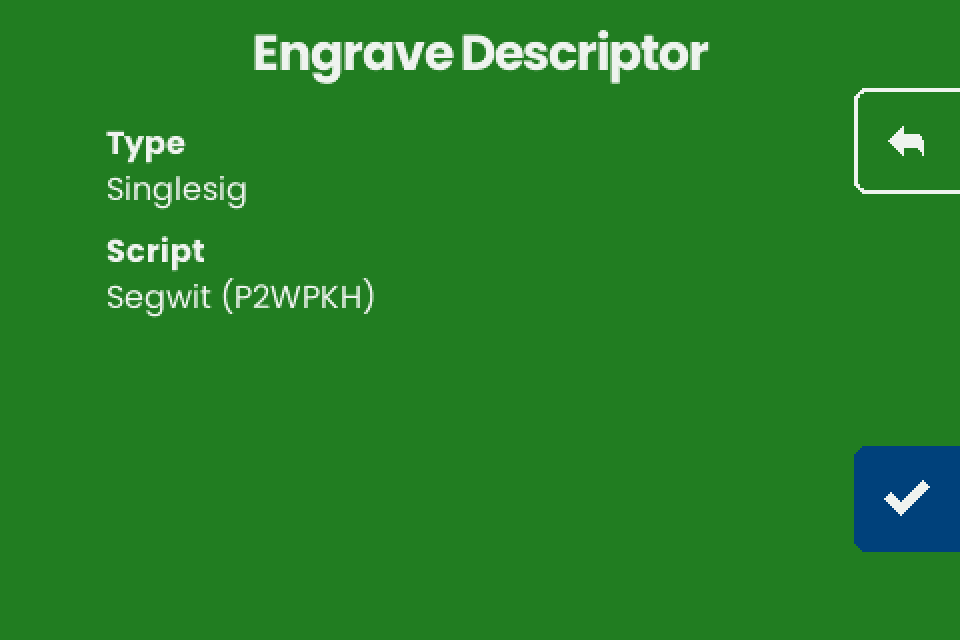
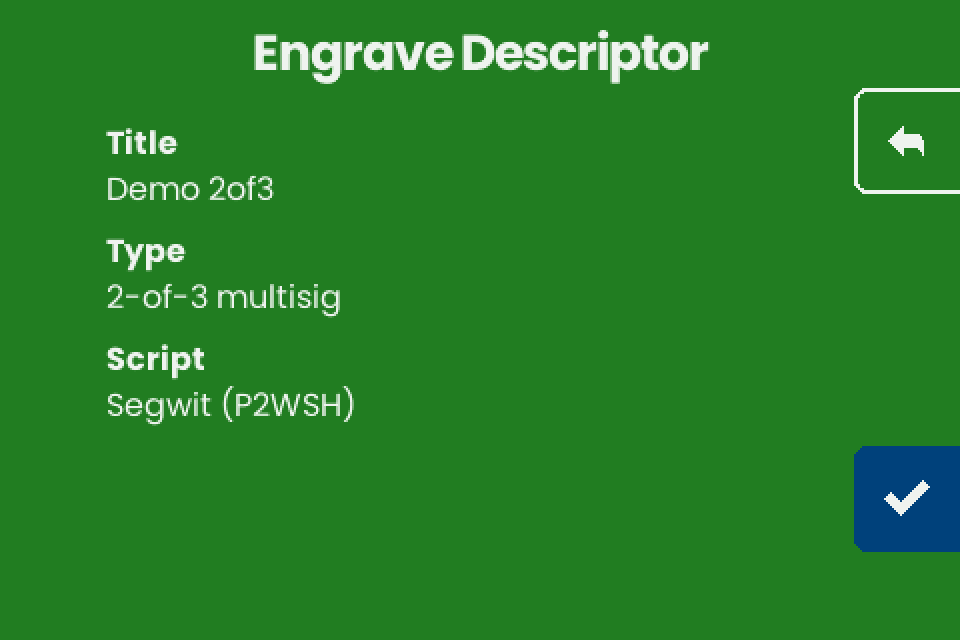
- Tap the checkmark (bottom of the right edge). "Engrave" lists "TEXT + QR", "TEXT ONLY" and "QR ONLY" for a single-sig descriptor, whose plate matches the export character for character, and "TEXT ONLY" and "QR ONLY" for the demo 2-of-3 (fit, plate spelling).
If it does not work
| Symptom | Cause | Fix |
|---|---|---|
| Nothing happens on the SH II | Not on "Backup Wallet", NFC off in the Coldcard, the Coldcard off the panel, or a JSON export | Return to "Backup Wallet", enable NFC, move the Coldcard, send an export from the table |
| "Unknown format" flashes | An export the machine does not read, most often Descriptors > Export tapped directly | Send an export that parses (table). Other causes: Troubleshooting |
| "Scan error" flashes | The transfer broke off. The Mk4 antenna is weak | Remove the Mk4 sleeve, hold flat and still, send again. Update the Coldcard firmware. Else go through a phone |
| "Legacy (P2PKH)" for a segwit wallet | Export XPUB sent | Tap back. Send Export Wallet > Descriptor |
| "Script" "Unknown", or the SH II stops responding after the checkmark | Coldcard Export of a legacy P2SH wallet: its file has no Format: line |
Tap back, never the checkmark. If it stopped, disconnect the power and reconnect it. Send the wallet through a phone |