Seed words are typed on the machine only and never pass through a phone, a computer, a chat assistant or NFC Tools. A Coldcard can send seed words and codex32 shares over NFC, and v1.4.3 accepts them into the seed flow (unverified). The secret would then travel over radio. Never tap a signer to the machine to engrave a seed. For a Coldcard descriptor, see Coldcard.
## What you need {#requirements} - The machine on "Backup Wallet", see [Power supply and first start](/doc/manual/power-and-first-start). - A blank 85 x 85 mm plate and hearing protection. - Your seed, written down: 12 or 24 words from the English BIP39 word list. The machine does not create seeds or work out a last word; for a dice seed, compute only the last (checksum) word with an offline device you trust. ## Type the words {#type} - On "Backup Wallet", tap the checkmark (bottom right). - On "Input Seed" ("Choose number of words"), tap **12 WORDS** or **24 WORDS**. The tap only selects the row. - Tap the checkmark (bottom right). Every letter key is lit each time "Input Words" opens, X included, and no seed word starts with X. Never press X as the first letter: the firmware stops and you start again from the beginning.
- Type the first letters of the word. Keys that cannot continue any BIP39 word go dim and stop responding. When only one word fits, the box shows it in full and every letter goes dim: ABA gives "1: ABANDON". - Read the box. LEG, LEGAL and LEGEND are all words: after LEG the checkmark appears while A and E stay lit, and tapping it stores LEG. - Tap the checkmark (middle right), shown only for a complete word. The box moves to the next word. - Repeat for every word. After the last one, "Engrave Seed" opens. 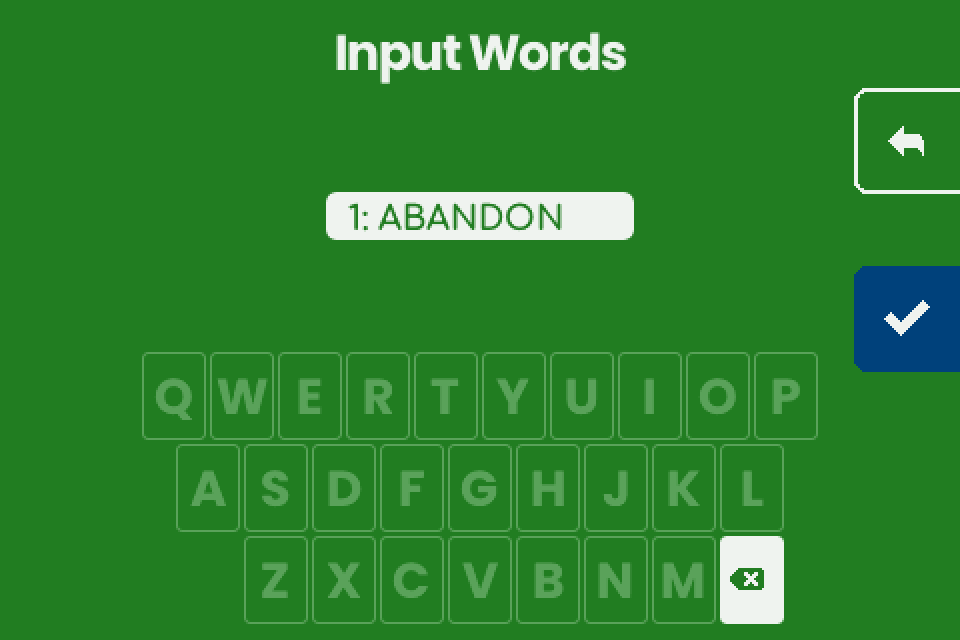 ## Check the words {#check} - Compare every word on "Engrave Seed" with your written seed, in order. - To fix a word: - Tap the word. - Tap the pencil (middle right). "Input Words" opens at that word. - Enter the word as in [Type the words](#type). - Tap the checkmark (bottom right), shown once every slot is filled. "Engrave Plate" opens, or "Invalid Seed" ([fix](#troubleshooting)). 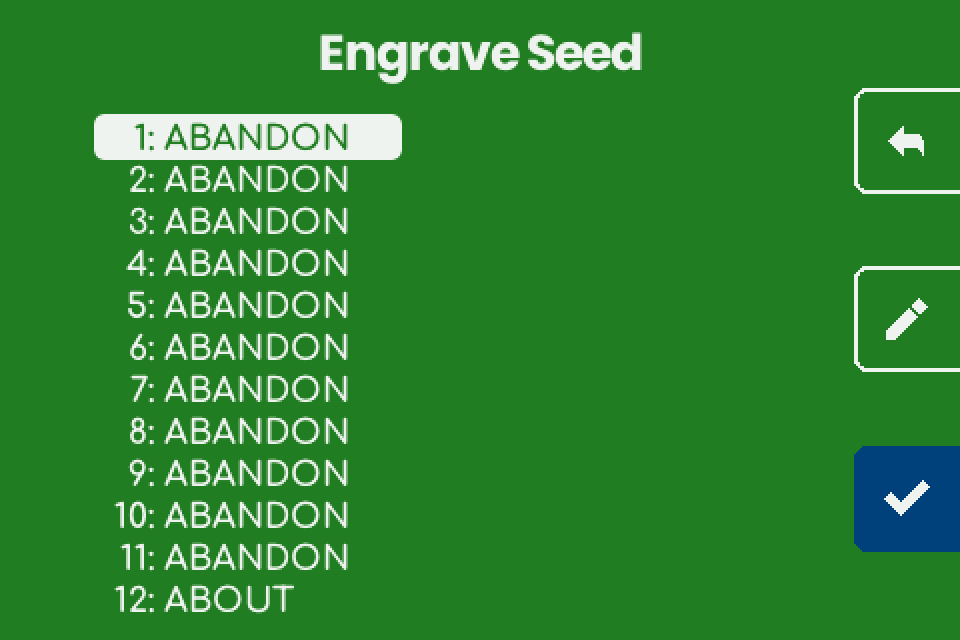 ## Engrave the plate {#engrave} - On "Engrave Plate", insert a blank plate and close the lock. - Put on hearing protection. - Hold the hammer button (bottom right) for 1 second. Stop, resume and errors: [Load a plate and engrave](/doc/manual/power-and-first-start#plate). - At "Engraving completed successfully.", tap the right arrow.  ## What the machine shows {#machine} | Screen | Shows | Back arrow (top right) | | --- | --- | --- | | "Input Seed" | "Choose number of words", rows **12 WORDS** and **24 WORDS**. | The start screen. | | "Input Words" | Word number and typed letters above a keyboard; backspace ends the bottom row. | Leaves at once and keeps the confirmed words: "Input Seed" if none, otherwise "Engrave Seed". | | "Engrave Seed" | "1: WORD", words 1 to 12 left and 13 to 24 right. An empty slot shows its number only. | "DISCARD SEED?" with "Going back will discard the seed." and "Hold button to confirm." Tap the back arrow to keep the words, or hold the trash bin (bottom right) for 1 second to drop the seed and return to the start screen. | | "Engrave Plate" | "Insert a blank plate and close the lock.", at the end "Engraving completed successfully." | Before the start: "Engrave Seed", words kept. | ## What the plate carries {#plate} One face: the master fingerprint (8 capitals, centred above the words), the numbered words in capitals and a SeedQR. No title, no passphrase. Full layout: [Seed plate](/doc/manual/titles-and-plate-layout#seed). Compare the fingerprint with the one your wallet shows for this seed with no passphrase; a match confirms the words. The 12-word test seed ("abandon" eleven times, then "about") gives 73C5DA0A.  ## Passphrases, shares and other seeds {#limits} - **Passphrase.** v1.4.3 has no passphrase screen and engraves no passphrase. Keep it in a separate backup made another way. - **Descriptor.** The seed flow never asks for one and does not compare the seed with one (unverified). For multisig, engrave each seed on its own plate and the descriptor on a free face: [What fits on a plate, and multisig without sharding](/doc/manual/multisig-and-fit). - **Electrum seeds** are refused with "Electrum seeds are not supported." only when the words fail the BIP39 checksum. One whose words pass is engraved as BIP39 with no warning, so know your seed type first. - **Other seeds and shares.** LND seeds (aezeed) are not BIP39 seeds and are not supported. 15, 18 and 21-word seeds, codex32 shares and SLIP-39 shares cannot be typed, and SLIP-39 is switched off. The machine does not split or combine seeds. A share is as secret as a seed: never send one over NFC to get around the menu ([Shares](/doc/manual/capability-sheet#shares)). ## If it does not work {#troubleshooting} | Symptom | Cause | Fix | | --- | --- | --- | | A letter you need is dim. | No BIP39 word continues the typed letters with it: an earlier letter is wrong, or the word is not on the English list. | Backspace and compare with your written seed. | | The screen stops responding after the first key. | X pressed as the first letter; the firmware stopped. | Disconnect and reconnect the power, then type the seed again. | | "Invalid Seed" / "The seed phrase is invalid." / "Check the words and try again." | The words fail the BIP39 checksum: a wrong word, two words swapped, a wrong last word, or never a BIP39 seed. | Tap the checkmark to return to "Engrave Seed". Compare each word in order and fix it with the pencil. | | "Invalid Seed" / "Electrum seeds are not supported." | An Electrum seed. | Stock firmware cannot engrave it as a seed. Keep it in another backup. | | The fingerprint on the plate differs from the wallet. | A passphrase in the wallet, a different word, or not a BIP39 seed (an Electrum seed that passed the BIP39 checksum never matches its Electrum wallet). | Compare the words first. If every word matches and the wallet uses BIP39, the difference is the passphrase. | | The job stops mid-plate and the start screen returns. | The charger reset itself (most likely) and the machine restarted. The words are gone. | Use another supply, type the seed again and restart the job: [Retry and restart](/doc/manual/troubleshooting#retry). | | An animation covers the screen. | Screen saver, after 3 minutes without a touch. | Touch the screen. The first touch presses nothing. | 