# Send a descriptor to the SH II with NFC Tools (iPhone and Android)


**Draft, not yet verified on hardware.**

Send a wallet descriptor from an iPhone or Android phone to the SH II with NFC Tools, on stock firmware v1.4.3. The machine has no descriptor menu: on its start screen, "Backup Wallet", it opens "Engrave Descriptor" by itself when a descriptor arrives.

<p class="alert alert-warning">Seed words are typed on the machine only and never pass through a phone, a computer or a chat assistant (<a href="/doc/manual/seed-entry">Enter a seed on the touchscreen</a>). A descriptor is not a secret and cannot spend. It reveals every address of the wallet, and with them the balance and history: keep it out of email, chat and cloud notes.</p>

## What you need {#requirements}

- The SH II on stock firmware v1.4.3 ("Firmware: v1.4.3" bottom right), on its power supply, showing "Backup Wallet".
- An iPhone 7 or later with iOS 15.6 or later (NFC is always on), or an Android phone with NFC switched on in the phone's settings, in the section for connections.
- NFC Tools by WAKDEV (<a href="https://apps.apple.com/us/app/nfc-tools/id1252962749" target="_blank">App Store</a>, <a href="https://play.google.com/store/apps/details?id=com.wakdev.wdnfc" target="_blank">Google Play</a>).
- The descriptor on the phone's clipboard: from [phone wallets](/doc/manual/descriptor-mobile-wallets) or [Sparrow and Specter](/doc/manual/descriptor-desktop-wallets).
- No phone? A Coldcard sends on its own: [Coldcard](/doc/manual/descriptor-coldcard). Tags and desktop writers: [capability sheet](/doc/manual/capability-sheet#tags).

## Prepare the text {#prepare}

Copy one text in one of these forms before you open NFC Tools.

- A plain descriptor on one line, for example `wsh(sortedmulti(2,[73c5da0a/48h/0h/0h/2h]xpub.../<0;1>/*,...))#spmyt389`, with no space or line break before or after it. A trailing line break gives "Unknown format".
  - If it contains `?` (Sparrow 2.5 and later add `?bh=` or `?gl=`), delete everything from `?` to the end, checksum included (unverified). The machine engraves its own checksum. Never retype key characters.
- JSON with a `"label"` and a `"descriptor"` field, as Specter exports it. Sparrow's **Specter Desktop** file with `?bh=` or `?gl=`: [delete the annotation](/doc/manual/descriptor-desktop-wallets#annotations).
- Coldcard or BlueWallet multisig text with a `Name:` line.
- Never a bare key such as an `xpub`; send a descriptor with key origins ([why](/doc/manual/capability-sheet#formats)).

## Write the descriptor with NFC Tools {#write}

- Open **NFC Tools**.
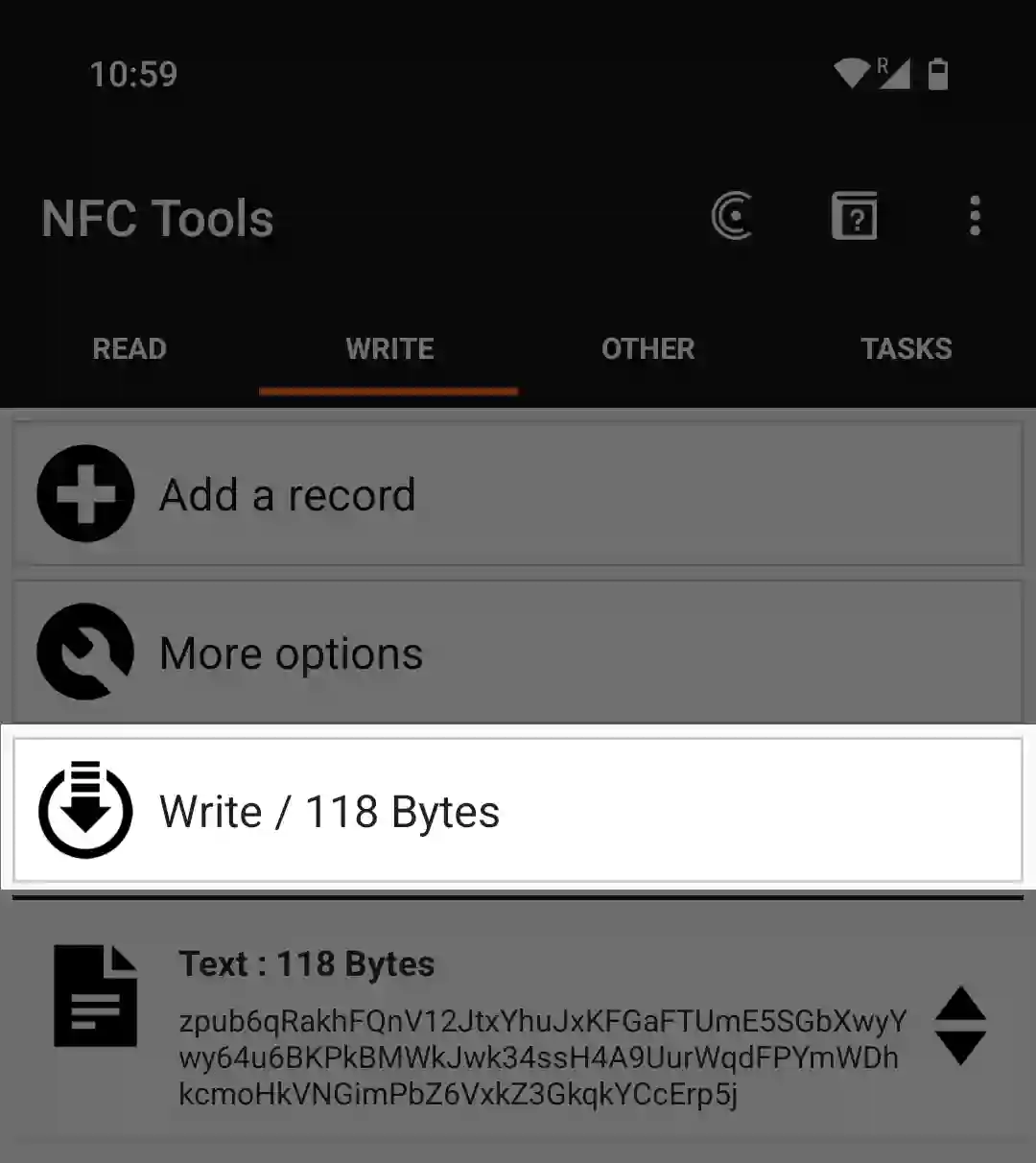
- Tap **Write** (Android: the **WRITE** tab).
- Tap **Add a record**.
- Tap **Text** ("Add a text record").
- Paste the descriptor into **Enter your text**.
- Tap **OK** (Android: the back arrow).
- Make sure the list shows exactly one record, "Text", with your descriptor (Android: with its size).
- To keep the phone offline, switch on airplane mode now (unverified).
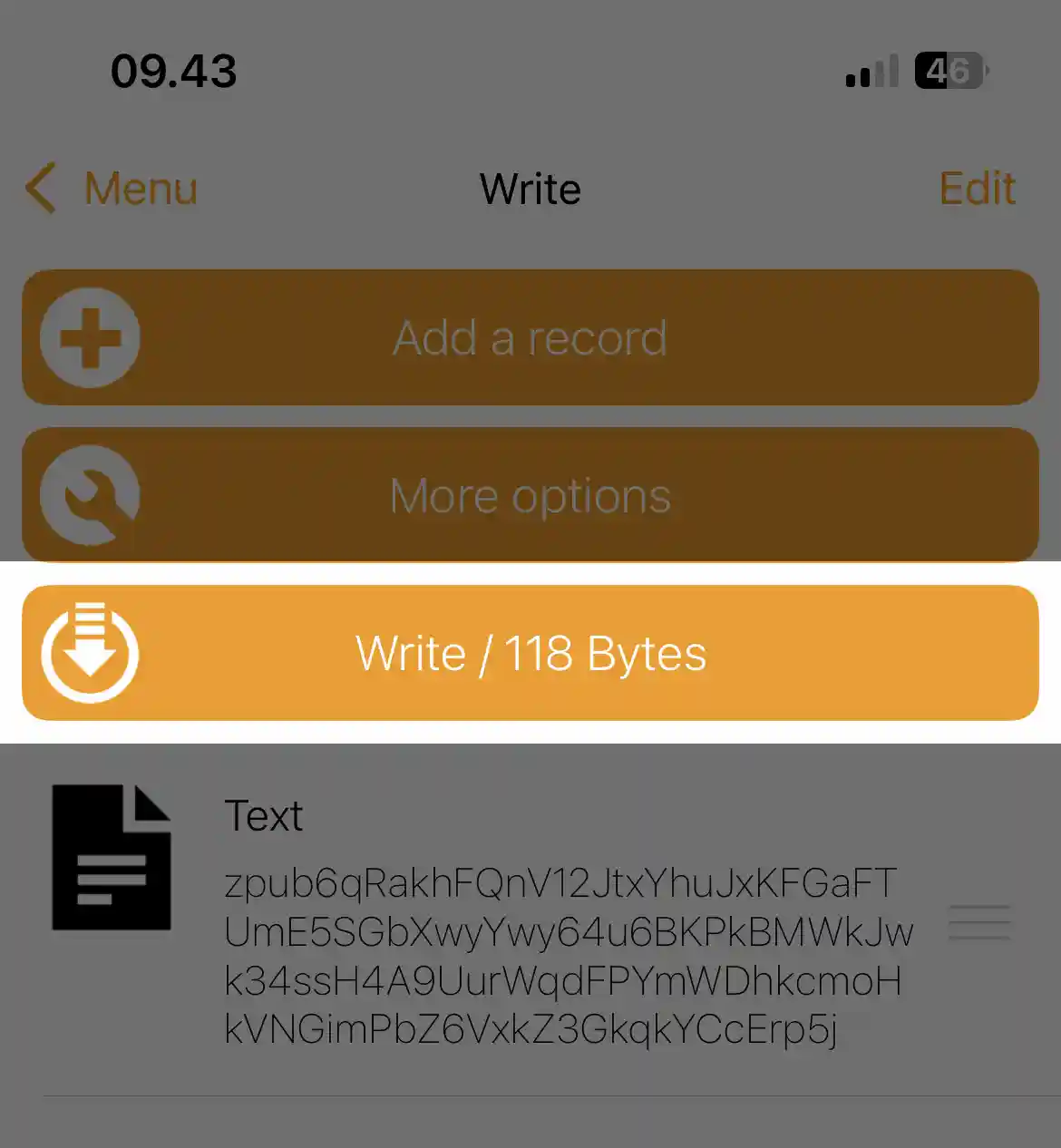
![NFC Tools on iPhone: the Write screen with one Text record and the Write button showing the size](/static/img/nfc-tools-transfer-01.webp)
<!-- capture: phone, iPhone, NFC Tools iOS 3.4, "Write" screen after adding one Text record with lab/fixtures/2of3-multipath.txt (the file has no final newline), button "Write / 467 Bytes" expected; no lab shot yet -->

![NFC Tools on Android: the WRITE tab with one Text record and the Write button showing the size](/static/img/nfc-tools-transfer-02.webp)
<!-- capture: phone, Android (record model), NFC Tools Android 9.8, WRITE tab after adding one Text record with lab/fixtures/2of3-multipath.txt (the file has no final newline), record row "Text : N Bytes" and button "Write / 467 Bytes" expected; no lab shot yet -->

- Tap **Write** beside the machine. iPhone: the scanning sheet closes after 60 seconds, or when you leave NFC Tools. Android: the dialog "Write on NFC Tag" opens with "Approach an NFC Tag".
- Hold the phone over the panel right of the display ([where](#hold)) until the iPhone sheet shows the write is done, or Android shows "Write complete!" (tap **OK**).

## Where to hold the phone {#hold}

- Leave the machine on "Backup Wallet"; NFC is off on every other screen.
- Lay the phone's NFC zone flat over the panel right of the display, not over the display, and keep still. iPhone: the top edge of the back. Android: near the top or the middle of the back, by model.

![The top edge of an iPhone held flat over the panel right of the SH II display](/static/img/nfc-tools-transfer-03.webp)
<!-- capture: photo, iPhone top edge flat over the panel right of the SH II display, machine on "Backup Wallet", NFC Tools scanning sheet visible; no lab shot yet -->

## What the machine shows {#machine}

- "Scanning..." on the start screen for about one second while data arrives. Watch the machine during the write.
- "Engrave Descriptor" when it accepts the text. Phone success only means the bytes arrived; this screen means carry on.
  - "Title", only for a JSON `label` or Coldcard `Name:`; shown, not engraved ([why](/doc/manual/titles-and-plate-layout#titles)).
  - "Type": "Singlesig", or for example "2-of-3 multisig". Testnet keys add " (testnet)".
  - "Script": for example "Segwit (P2WSH)" or "Segwit (P2WPKH)".
- No addresses, fingerprints or xpubs show. If Type or Script is wrong, tap back (top of the right edge).
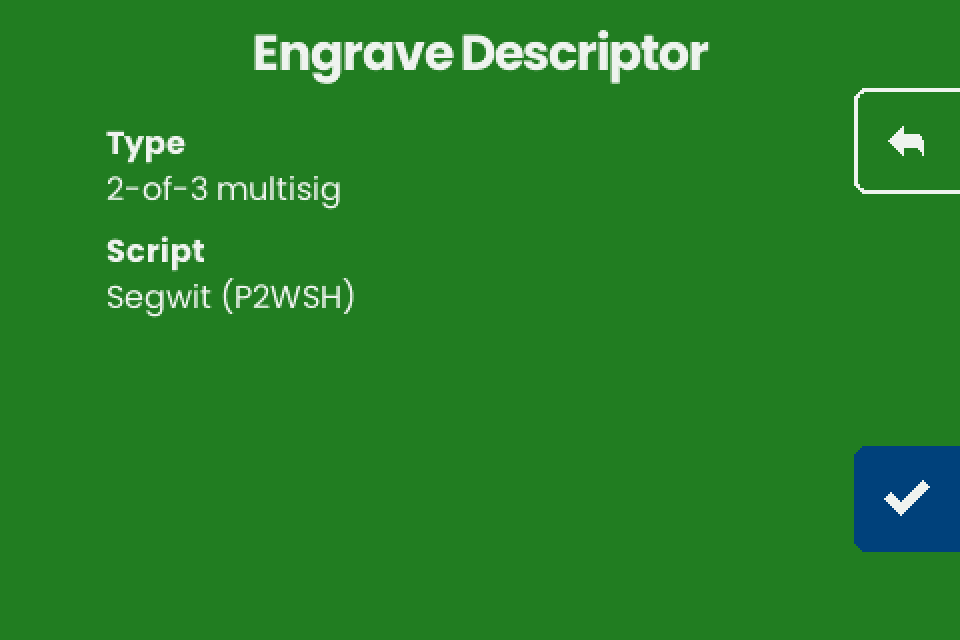
![Engrave Descriptor for the demo 2-of-3 wallet](/static/img/nfc-tools-transfer-04.webp)
<!-- capture: II screen, "Engrave Descriptor" after NFC payload lab/fixtures/2of3-multipath.txt (no final newline): "Type" "2-of-3 multisig", "Script" "Segwit (P2WSH)", no Title; Go capture per research/device-screen-map.md 4.2 row 28 with this payload -->

- Tap the checkmark (bottom right). "Engrave" lists the layouts that fit ([fit](/doc/manual/multisig-and-fit#fit)).
- Compare the plate with your wallet by first receive address ([why](/doc/manual/multisig-and-fit#differences)).
- Delete the record from the NFC Tools write list when you are done.

## If it does not work {#troubleshooting}

| Symptom | Cause | Fix |
| --- | --- | --- |
| The phone never finishes the write, or the iPhone sheet closes with an error | The machine is not on "Backup Wallet", the phone is not over the panel, a case is in the way, or NFC is off on Android. iPhone: the 60-second limit ran out, or NFC Tools went to the background | Fix it, then tap **Write** beside the machine and stay in NFC Tools |
| The phone reports success, the machine shows nothing | The record is not Text, or is empty | Use one **Text** record |
| NFC Tools reports an error at the end of the write, or the write stops part way | The phone moved, or the machine answered late: on stock v1.4.3 its emulated tag promises an answer within about 77 ms (FWI 8), and one step of a large write sometimes takes longer while the screen redraws | An error shown by NFC Tools after the write is harmless when the machine shows the next screen, "Engrave Descriptor". If it shows "Backup Wallet", hold still and write again |
| "Unknown format" flashes for a second | A "URL / URI" record, which adds `https://` (the Android default), or a space or line break around a one-line descriptor | Use a **Text** record with nothing around the text. Other causes: [Troubleshooting](/doc/manual/troubleshooting#nfc) |
| "Scan error" | The transfer broke off | Write again, or see [Troubleshooting](/doc/manual/troubleshooting#nfc) |
| "Too Large" | The descriptor does not fit a plate; not a transfer problem | See [What fits on a plate](/doc/manual/multisig-and-fit#fit) |
| The machine takes an old descriptor | NFC Tools still holds an earlier record (unverified) | Delete it and keep one record |

<!--
bench-checks:
  - [ ] Phone side, NFC Tools iOS 3.4 and Android 9.8 (record phone model and OS version): labels Write / WRITE, Add a record, Text ("Add a text record"), Enter your text; which control keeps the record (iOS OK or < Write; Android back arrow or a button); the delete control for a record; button "Write / 467 Bytes" for the demo 2-of-3 (computed for 457 characters with a 2-letter language code); iOS scanning sheet title, instruction text, cancel label, success and failure wording, 60 s timeout (approach at about 55 s and about 65 s), app switch ends the session; Android "Write on NFC Tag" / "Approach an NFC Tag" / "Write complete!" on 9.8, failure dialog wording, how long the approach dialog waits; NFC Tools writes in airplane mode on iOS and Android (body: "(unverified)" in #write)
  - [ ] Placement and machine state: iPhone top edge over the panel right of the display versus over the display; Android at its antenna zone; with and without a case; flat on the panel, then 1, 2 and 3 cm above it (record where writes stop); machine on a screen other than "Backup Wallet": what each phone reports; screen saver after 3 minutes idle on "Backup Wallet": does an NFC write land while it runs, does the waking touch leave the start screen untouched (body states only that "Backup Wallet" listens); "Scanning...", "Unknown format" and "Scan error" each show about 1 s; repeated "Scan error" after an overflow (a tag holding 8 KB of text or more, if one can be found) clears after checkmark, then back on "Input Seed"; captures: shoot the phone screens and the placement photo, no lab/nfctools/ shots exist yet
  - [ ] Demo 2-of-3 (lab/fixtures/2of3-multipath.txt, no final newline) from an iPhone and an Android phone: "Scanning...", then "Engrave Descriptor" with "2-of-3 multisig" and "Segwit (P2WSH)", no seed asked first (SYNTHESIS F16; release gate: the lead states this from source); engraved text matches the descriptor in keys, fingerprints, paths and threshold; plate spelling: the demo sent with ' markers (expect h on the plate and the machine's own checksum), lab/fixtures/2of3-coldcard.txt (expect no /<0;1>/* on the plate), a Coldcard-format text with Zpub keys (expect xpub on the plate). Write errors on stock firmware: 20 consecutive writes of the demo per phone, then at 4 KB and at the 8190-byte ceiling; count failures and end-of-write errors; record the phone's refusal wording at 8191 bytes. This page owns the cause statement (research/BRIEF.md bench fact on stock v1.4.3 plus type4.go FWI 8, upstream PR #38)
  - [ ] Records and text: "URL / URI" with a descriptor on both platforms (record the default prefix, expect https on Android, expect "Unknown format"); "Custom URL / URI" with the same text (record the result); Data or MIME record (phone success, machine shows nothing); two Text records: which one the machine takes (body: "(unverified)" in the troubleshooting table); trailing newline and leading space around a plain descriptor ("Unknown format"); Coldcard text with CRLF ("Unknown format"); Android NFC Tools keeps line breaks in multi-line Coldcard text; Sparrow 2.5 descriptor with ?bh= as is ("Unknown format"), then with everything from ? to the end removed ("Engrave Descriptor", the machine's own checksum on the plate; body: "(unverified)" in #prepare), compare the plate with the wallet; BlueWallet wrapped vault (Format: P2SH-P2WSH) and bare ypub ("Unknown format"; full cause list on troubleshooting#nfc); JSON with a label (lab/fixtures/2of3-specter.json): braces left alone by NFC Tools dynamic variables, "Title" "Demo 2of3" shown, title absent from the plate (release gate: "shown, not engraved" from source, SYNTHESIS F11). Physical tags, tag emulation and desktop writers live on capability-sheet#tags; the pointer stays in #requirements
notes: edit pass 2026-10-10 (EDIT_BRIEF). The NFC Tools labels in #write follow the official manual's screenshots, which carry no app version; the body no longer says so. Five reader-facing Checks left the body: labels (bench item 1), airplane mode (item 1, now "unverified"), the `?` removal (item 4, now "unverified"), the screen saver (item 2), two records (item 4, now "unverified"). The iPhone and Android step lists merged into one list with platform notes; Android NFC on moved to #requirements; troubleshooting became a table; the privacy note took the one-sentence form inside the alert. Scoped to a one-line descriptor, as #prepare already was: the "Unknown format" whitespace cause (REVIEW-wave2 2.4) and the `?` step (REVIEW-wave2 1.2: Sparrow's Specter Desktop JSON keeps its closing quote; #prepare points to descriptor-desktop-wallets#annotations). Verification fixes: "(unverified)" moved onto the `?` instruction (desktop-wallets 1.3: not bench-tested; the own checksum is from bip380 Encode); "cannot spend" and "balance and history" restored in the alert; Android record row size restored; the iPhone app-switch fact kept once in #write and once in the troubleshooting table.
sources: research/nfc-tools-transfer.md (sections 0 to 6 and 9), research/device-screen-map.md (1.1, 1.2, 1.3 A, 1.4, 1.5, 2, 3, 4.2, 6), research/BRIEF.md (device facts, corrections, bench fact on the write error: FWI 8, about 77 ms, harmless when the machine shows the next screen), research/desktop-wallets.md (key findings 1, 1.3, section 3), research/mobile-wallets.md section 1, lab/TESTWALLET.md, lab/fixtures/2of3-multipath.txt, 2of3-coldcard.txt and 2of3-specter.json, lab/check/RESULTS.md notes 1 to 6 (firmware ea4b65b), firmware gui/gui.go DescriptorScreen.Draw ("%d-of-%d multisig"), gui/scan.go Scan (8*1024 buffer, sticky overflow), nfc/type4/type4.go (FWI 8 comment "~77ms"), bip32/bip32.go Path.Encode ('h'), bip380/bip380.go Encode and ParseExtendedKey (own checksum, keys normalised to xpub), harvest Q12 Q13 Q14 Q15 Q47, SYNTHESIS D (write error, write timeout, desktop writer, card not read, engraved checksum differs), SYNTHESIS F 9 11 12 14 16 17, manuals/REVIEW-wave1.md sections 2 to 4 (harmonized, see manuals/HARMONIZE-wave1.md), manuals/REVIEW-wave2.md (1.2, 2.4, 3.10)
-->