# Descriptor export from phone wallets (Cove, Nunchuk, BlueWallet and others)
**Draft, not yet verified on hardware.**
A phone wallet holds the wallet descriptor, and NFC Tools on the same phone sends it to the SH II (stock firmware v1.4.3). Labels: Nunchuk 2.9.0, BlueWallet 8.0.2, Cove 1.3.0 and Bitcoin Keeper 2.6.3 on Android; Envoy 2.3.5; the Blockstream app 5.7.0 (unverified).
Seed words are typed on the machine only and never pass through a phone, a computer or a chat assistant. A descriptor is not a secret, but it reveals every address of the wallet: keep it out of email, chat and cloud storage.
## What you need {#requirements}
- The SH II on stock firmware v1.4.3, showing "Backup Wallet", and NFC Tools on the phone that holds the wallet ([write steps](/doc/manual/nfc-tools-transfer#write)).
- A single-sig wallet, or a sorted multisig as P2WSH, P2SH-P2WSH or P2SH ([scripts](/doc/manual/capability-sheet#scripts)). Taproot multisig, miniscript and unsorted `multi` give "Unknown format".
## Pick the export {#choose}
| App | Export | Text | "Title" on the machine |
| --- | --- | --- | --- |
| Nunchuk | **Descriptor** file; **Coldcard** file (multisig only) | one line, `/0/*` or `/<0;1>/*` | none |
| BlueWallet, vault | **Export Coordination Setup** | setup text, one entry per line | vault name |
| Cove, single-sig | **Export Xpub** | one line, `/<0;1>/*` | none |
| Bitcoin Keeper | **Wallet configuration file** | one line, `/<0;1>/*` | none |
| Envoy, Blockstream app (single-sig) | **Show Descriptor**; Blockstream **Output Descriptors** (unverified) | `/0/*`; Blockstream adds a second line | none |
| Bare key: never send | BlueWallet **Show Wallet XPUB**, Keeper **Show xPub**, Blockstream **Extended Public Keys** (unverified) | no fingerprint or path; `zpub` read as "Segwit (P2WPKH)", `ypub` as "Unknown format", `xpub` as "Legacy (P2PKH)", wrong for Keeper's segwit hot wallet ([bare keys](/doc/manual/capability-sheet#formats)) | none |
## Export from the wallet {#export}
### Nunchuk {#nunchuk}
- Open the wallet, tap the three-dot menu at the top right, then **View wallet config**.
- On "Wallet config", tap the three-dot menu again, then **Export wallet configuration**.
- Under "Select the export format", tap **Descriptor**, then **Save file**.


- Nunchuk writes `_descriptor.txt` straight into `Download/`, with no picker and no confirmation: one line, `/0/*`, `'` markers, a checksum, no line break at the end. There is no copy button, and **Share file** offers no Copy: open the file in a file manager or text editor, select all and copy. On an iPhone, copy the saved file from the Files app (unverified).
- Multisig only: **Coldcard**, **Export via file (advanced)**, **Save file** writes `_coldcard_export.txt` the same way: the descriptor with `/<0;1>/*`, change addresses included, also accepted. **BSMS** gives "Unknown format". **Export via QR** (static), **QR code** and **Export via BBQR** (animated) show QR codes, not text to copy. **Do it now** in the banner "Please back up your wallet configuration." offers the same BSMS and Coldcard files.
### Cove (single-sig only) {#cove}
- Open the wallet, tap the three-dot menu at the top right, then **Export Xpub** in "More Options".
- In the dialog "Export Xpub", tap **QR Code**, then the copy icon at the top right of the sheet "Export Xpub" ("Public descriptor for watch-only wallet"). Cove shows "Copied".
- The clipboard holds one line with no line break, for example `wpkh([73c5da0a/84h/0h/0h]xpub.../<0;1>/*)#qf45pmyh`. **Share...** in the dialog gives the same text as a file named after the wallet, for example `imported_73c5da0a_descriptors.txt`.
### BlueWallet {#bluewallet}
- Open the vault and tap the dots button at the top right. The wallet details open.
- Tap **Export Coordination Setup**.
- Long-press the text, tap **Select all**, then **Copy**. The clipboard holds the exact text.

- Or tap **Share...**, then **Save...**: the file is the vault name without spaces, for example `Demo2of3.txt`. Send the text whole, with its line breaks and the empty line at the end; the `Name:` value becomes the "Title".
- A wrapped segwit vault writes `Format: P2SH-P2WSH`, which the machine refuses: change it to `Format: P2WSH-P2SH` in the NFC Tools text field (unverified). A cosigner on its own path appears only in a `# derivation:` comment, and the machine skips comments: that key gets the common `Derivation:` path, so do not engrave such a vault from this export.
- Do not use **Export/Backup** under **Advanced**: for a vault that holds a key, it contains the seed. A cosigner's **Share...** gives JSON while the vault is built ("Unknown format") and a bare `xpub` afterwards under **View/Edit Co-signers** (read as "Legacy (P2PKH)", a wrong plate): never send it. A single-sig wallet has no export with fingerprint, path and child path (the app says a zpub, ypub or xpub "will not keep the path or fingerprint"): back it up as a seed plate ([Enter a seed on the touchscreen](/doc/manual/seed-entry)).
### Bitcoin Keeper {#keeper}
- Open the vault and tap the gear icon in its header. "Wallet Settings" opens.
- Tap **Wallet configuration file**, then **Show QR** in "Export Wallet Configuration".
- Tap the descriptor box under the QR code, then the copy icon in the share sheet "Sharing text".

- **File Export** shares the same text as `Demo-2of3.txt`; its upper-case fingerprints are accepted. Inheritance, emergency and timelock vaults (miniscript) give "Unknown format", as does a key's **Co-signer Details** (**Keys** tab, the key, **Share Key**, then **Show QR** in "Share Key Details"). **NFC** on Android makes the phone act as a Type 4 tag, and the SH II reads only Type 2 and Type 5 tags ([tags](/doc/manual/capability-sheet#tags)): it reaches nothing (unverified).
### Envoy and the Blockstream app (single-sig) {#envoy-blockstream}
- Envoy: open the account, tap the more menu at the top right, then **Show Descriptor**. **Segwit** is preselected in the dropdown and **Taproot** can be chosen; keep **Segwit** and tap **Copy** ("Descriptor copied to clipboard."). The text is one line with no line break, `wpkh([fingerprint/84'/0'/0']xpub.../0/*)#...`, accepted as "Singlesig", "Segwit (P2WPKH)". A Taproot descriptor is read as "Taproot (P2TR)" (unverified on a plate).
- Blockstream app (unverified): open the wallet settings, tap **Watch-only**, and under Singlesig tap the copy button on the account's **Output Descriptors** row. The text has two lines, receive (`/0/*`) and change (`/1/*`): after pasting into NFC Tools, delete the second line and the line break before it.
## Hardware signers {#signers}
- Jade, Keystone, Passport Core, SeedSigner and Krux cannot send anything to the SH II, and their QR codes (Jade's multisig export included) are animated UR codes, which a phone cannot copy. Type each signer's seed words on the machine ([Enter a seed on the touchscreen](/doc/manual/seed-entry)) and send the descriptor from the phone wallet.
- Keystone (microSD), Passport Core (**Export via microSD**) and Passport Prime (**Export Multisig Config**) write multisig setup text to a file, and Jade Plus (Options, **USB Storage**, **Export Xpub**) writes `jade-xpub.txt`, a single-sig receive descriptor (`/0/*`): move the file to the phone through a computer. Setup text in P2WSH is accepted with the wallet name as "Title"; wrapped segwit from Jade and Passport Core (`Format: P2SH-P2WSH`) gives "Unknown format".
- BitBoxApp (**Account info**, **View account details**, copy button under **Descriptor**) gives a single-sig descriptor the machine accepts. Trezor Suite (**Show public key**) and Ledger Wallet (**Advanced**) show only a bare key ([Pick the export](#choose)); a Trezor Taproot account shows a descriptor, read as "Taproot (P2TR)" (unverified). For a multisig with a BitBox02, Trezor or Ledger, take the descriptor from the coordinator.
- Unchained: Sparrow's **Unchained Caravan Multisig** and the Coldcard **Unchained** export are JSON without a descriptor ("Unknown format"); if the wallet is also set up in Sparrow, export from [there](/doc/manual/descriptor-desktop-wallets). Coldcard Mk4 and Q send over NFC themselves: [Send a descriptor from Coldcard Mk4 or Q](/doc/manual/descriptor-coldcard).
## Send it from the same phone {#transfer}
- Open NFC Tools and paste the export into one **Text** record ([Prepare the text](/doc/manual/nfc-tools-transfer#prepare)): nothing before or after a one-line descriptor; BlueWallet text keeps one entry per line.
- Tap **Write** and hold the phone over the panel right of the display ([Write the descriptor](/doc/manual/nfc-tools-transfer#write)). On an iPhone, stay in NFC Tools: leaving it ends the write.
## What the machine shows {#machine}
- On "Backup Wallet": "Scanning...", then "Engrave Descriptor" with "Type" ("Singlesig" or for example "2-of-3 multisig") and "Script" (for example "Segwit (P2WSH)", "Nested Segwit (P2SH-P2WSH)", or "Segwit (P2WPKH)" for Cove and Envoy). "Title" appears above them only for setup text with a `Name:` line (BlueWallet, signer files) or JSON with a label; it is shown, not engraved ([Titles](/doc/manual/titles-and-plate-layout#titles)). If Type or Script differ from the wallet (Nunchuk: "2/3 Multisig", "Native segwit" on "Wallet config"), tap the back button (top of the right edge).
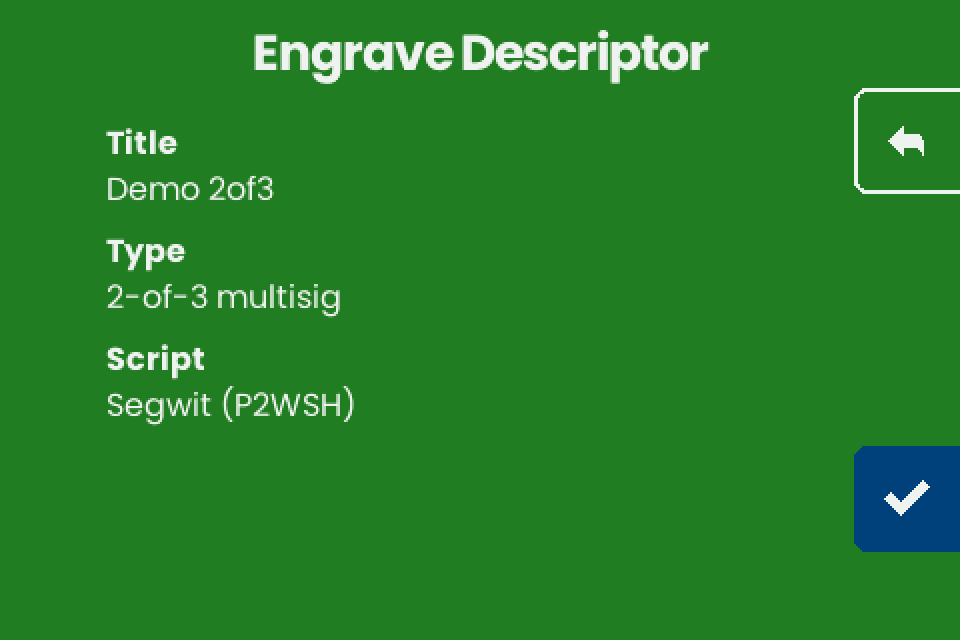
- Tap the checkmark (bottom of the right edge). "Engrave" lists under "Choose engraving" only the layouts that fit: "TEXT ONLY" and "QR ONLY" for every 2-of-3 export on this page, also "TEXT + QR" for a single-sig descriptor such as Cove's; a 3-of-5 gets "Too Large" instead ([What fits](/doc/manual/multisig-and-fit#fit)).
- The plate does not repeat the export character for character: `h` for `'`, `xpub` for `Zpub`, the machine's own checksum, no child path from setup text ([Why the plate differs](/doc/manual/multisig-and-fit#differences)).
## If it does not work {#troubleshooting}
| Symptom | Cause | Fix |
| --- | --- | --- |
| "Unknown format", Nunchuk file | **BSMS** export | Export **Descriptor** or **Coldcard**. |
| "Unknown format", BlueWallet or Blockstream text | `Format: P2SH-P2WSH`; Blockstream's second line (unverified); line breaks lost | Edit as in [BlueWallet](#bluewallet) or [Blockstream](#envoy-blockstream); one entry per line in NFC Tools. |
| "Unknown format", vault or key export | Miniscript or taproot vault (Keeper inheritance, emergency, timelock; Nunchuk taproot or miniscript); a cosigner key | Such a vault cannot be engraved on stock v1.4.3: engrave the seeds and keep the descriptor another way. For a key, send the wallet export. |
| "Singlesig" "Legacy (P2PKH)" for a multisig or segwit wallet | A bare `xpub`: Keeper **Show xPub**, or a BlueWallet cosigner's **Share...** after the vault is built | Tap back and send a descriptor export. |
| "Unknown format" for a correct export, "Scan error", a write that never ends | Spaces or line breaks around the paste, Windows line ends, a "URL / URI" record, the transfer | [NFC Tools transfer](/doc/manual/nfc-tools-transfer#troubleshooting), [Troubleshooting](/doc/manual/troubleshooting#nfc) |