Seed words are typed on the machine only and never pass through a phone, a computer or a chat assistant.
A descriptor is not a secret, yet it reveals every address of the wallet. ## At a glance {#summary} | Question | v1.4.3 | | --- | --- | | How does a seed get in? | Typed on the touchscreen: 12 or 24 BIP39 words. | | How does a descriptor get in? | As text over NFC, written by a phone app such as NFC Tools while "Backup Wallet" is shown. | | Camera, SD card, QR scanner, USB data cable, SeedSigner or another device? | None needed. No camera, no SD card. USB-C carries power; its only data is a firmware file in upgrade mode. | | A descriptor or an xpub without a seed? | Yes (unverified). One job engraves one thing: a seed, a descriptor or a codex32 share. Send a descriptor with key origins, not a lone xpub. | | Multisig? | Yes, without a multisig menu: each seed on its own plate, then the descriptor. | | Largest multisig that fits? | Four keys (2-of-4, 3-of-4) with full key origins, as text or as QR, not both (unverified). Five keys or more: "Too Large". [What fits on a plate](/doc/manual/multisig-and-fit#fit). | | Scripts? | Single-sig P2PKH, P2WPKH, P2SH-P2WPKH, single-key P2TR (unverified); multisig `sortedmulti` in P2WSH, P2SH, P2SH-P2WSH. | | Taproot multisig, miniscript, unsorted `multi`? | No: "Unknown format". | | codex32? | One share at a time, over NFC only, engraved as received; not in the menu (unverified). [Shares](#shares). | | SLIP-39? | No. | | Passphrase? | No entry screen; nothing engraves it. | | Titles or custom text? | No custom text. A label in the export is shown on screen and not engraved (unverified). [Titles](/doc/manual/titles-and-plate-layout#titles). | | Seed generation, dice entry, last-word calculation? | No. | | Split a seed or a descriptor across plates? | No. A descriptor plate carries the whole descriptor. | | Preview or dry run? | No. | | Plates | One size, 85 x 85 mm, one face per job. | ## What you need {#requirements} - The machine and a USB-C PD supply offering 20 V or 28 V at 5 A (100 W or 140 W); the firmware starts on 20 V to 28 V at 3 A or more ([power](/doc/manual/power-and-first-start#power)). - Blank SH02 or SeedHammer II plates, 85 x 85 mm. - For a descriptor: a phone with NFC and the NFC Tools app (iPhone or Android). ## The hardware {#hardware} | Part | What it does | | --- | --- | | 3.5" touchscreen, 480 x 320 | All controls. Three touch slots on the right edge act as buttons (back, edit, checkmark, hold); no physical menu buttons. | | NFC reader, right of the display (ST25R3916 chip) | Receives text from a phone or a tag, only while "Backup Wallet" is shown. | | USB-C port | Power. In firmware upgrade mode it appears on a computer as a USB drive; release firmware reads no data over USB. | | Engraver | One 85 x 85 mm plate per job, one face, 3 mm safety margin on every side. | The start screen shows "Firmware: v1.4.3" at the bottom right; power faults: [Power supply and first start](/doc/manual/power-and-first-start#troubleshooting).  ## How data gets in {#input} | Route | How | Full steps | | --- | --- | --- | | Touchscreen | From "Backup Wallet": the checkmark (bottom of the right edge), "12 WORDS" or "24 WORDS" on "Input Seed", then each word on "Input Words". Letters that cannot continue a BIP39 word go dim. | [Enter a seed on the touchscreen](/doc/manual/seed-entry) | | NFC | On "Backup Wallet" the machine acts as an empty NFC tag, and a phone writes text to it as to a sticker tag. The machine decodes the text and opens the matching screen itself. No descriptor menu. | [Send a descriptor with NFC Tools](/doc/manual/nfc-tools-transfer) | 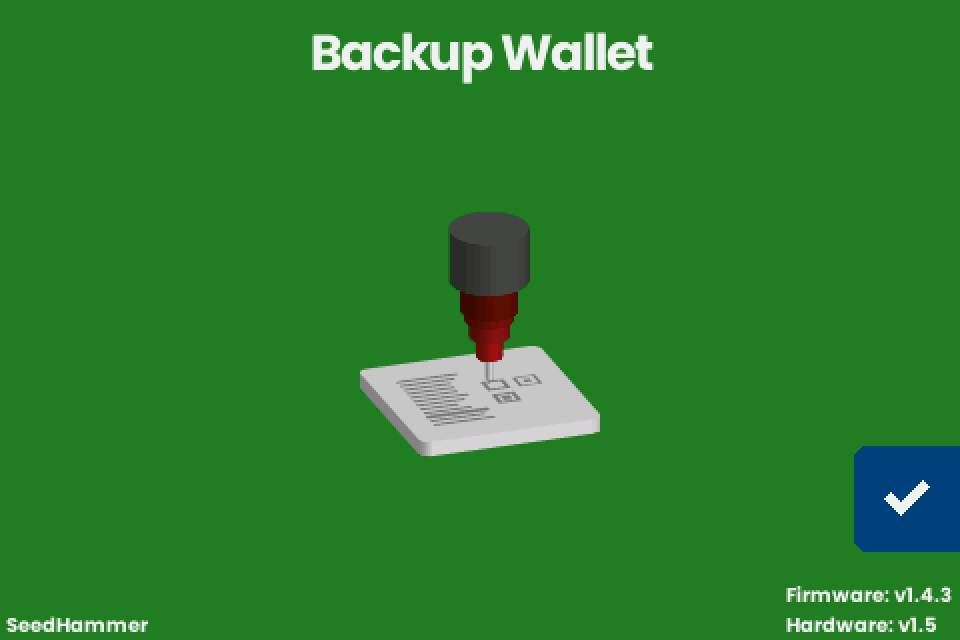 | NFC fact | v1.4.3 | | --- | --- | | When it listens | Only on "Backup Wallet". NFC is off on every other screen. | | Records it reads | NDEF Text, UTF-8. URI records arrive with their prefix in front: a descriptor sent as a URL becomes `https://wsh(...)` and fails. | | Records it ignores | UTF-16 Text, Data and MIME records, Smart Poster, external types. The phone still reports success; the machine shows nothing. | | Size | Receive buffer 8192 bytes. A phone writes at most about 8180 characters, far more than any supported descriptor. | | Read back | Always an empty tag. A phone cannot check what it sent by reading the machine. | | Status line | "Scanning...", "Unknown format" or "Scan error", each for about one second. | | Spaces and line breaks | Not trimmed. A trailing space or line break makes a plain descriptor, a key, seed words or a codex32 share fail; Coldcard-style text and JSON tolerate a final line break. | 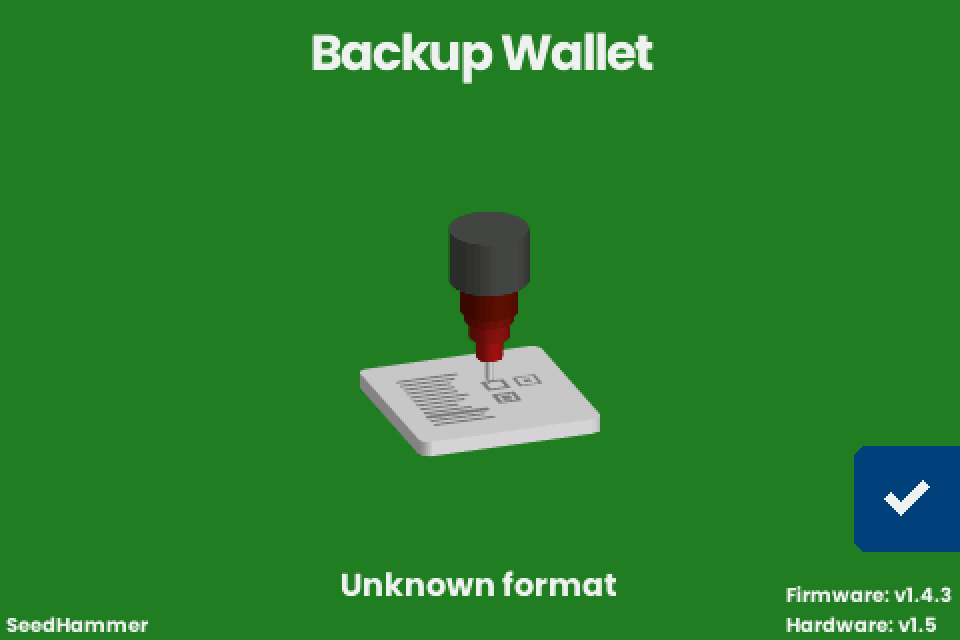 ## What it accepts over NFC {#formats} The machine tries each reading in this order and takes the first one that works. | # | Text received | Next screen | Title on screen | | --- | --- | --- | --- | | 1 | BIP39 seed words separated by single spaces | "Engrave Seed" | none | | 2 | Coldcard or BlueWallet multisig text with a `Name:` line | "Engrave Descriptor" | the `Name:` value | | 3 | A plain descriptor (BIP380), single path such as `/0/*` or multipath `/<0;1>/*` | "Engrave Descriptor" | none | | 4 | JSON `{"label": ..., "descriptor": ...}`; other keys are ignored | "Engrave Descriptor" | the label | | 5 | One extended public key for a single-sig wallet (see below) | "Engrave Descriptor" | none | | 6 | A codex32 share | "Engrave Plate" at once | none (no confirmation screen) | | | Anything else | stays on "Backup Wallet", "Unknown format" | | A descriptor or a key needs no seed: from "Backup Wallet" the machine goes straight to "Engrave Descriptor" (unverified). Never send a bare key, which is read by its prefix alone; send a descriptor with its key origin. | Key sent | Read as | On the plate | | --- | --- | --- | | `xpub...` | "Legacy (P2PKH)", path m/44'/0'/0', even from a native segwit wallet or a multisig cosigner | `pkh(xpub...)`, the wrong script for a segwit wallet. The key is rebuilt for that path: an account-0 single-sig key keeps its string; a key at another depth (a multisig cosigner key) or from another account becomes a different string | | `zpub...` | "Segwit (P2WPKH)", path m/84'/0'/0' | `wpkh(xpub...)`: the string never matches the `zpub` your wallet shows | | `ypub...`, `Ypub...`, `Zpub...` | "Unknown format" | | | `[fingerprint/84h/0h/0h]xpub...` (key with origin) | "Segwit (P2WPKH)", fingerprint kept; a cosigner key with a `48h` origin gives "Unknown format" | the key with its origin | A bare key is engraved without fingerprint, path or child path such as `/0/*`. Seed words over NFC are decoded up to 24 words, in multiples of 3, with a valid checksum; a wrong checksum shows "Unknown format" on this route, as does an Electrum seed in most cases. Do not send seed words from a phone or a signer; type them as in [Enter a seed on the touchscreen](/doc/manual/seed-entry). SeedQR digits are not decoded. **Important:** never send text that starts with `command: `, which is reserved for hidden debug commands: one changes the boot settings permanently, another starts the axes moving on a screen with no way out. ## Scripts {#scripts} | Wallet type | Descriptor | "Script" on screen | v1.4.3 | | --- | --- | --- | --- | | Single-sig legacy | `pkh(...)` | "Legacy (P2PKH)" | yes | | Single-sig native segwit | `wpkh(...)` | "Segwit (P2WPKH)" | yes | | Single-sig nested segwit | `sh(wpkh(...))` | "Nested Segwit (P2SH-P2WPKH)" | yes | | Single-sig taproot, one key | `tr(KEY)` | "Taproot (P2TR)" | yes (unverified) | | Multisig native segwit | `wsh(sortedmulti(...))` | "Segwit (P2WSH)" | yes | | Multisig nested segwit | `sh(wsh(sortedmulti(...)))` | "Nested Segwit (P2SH-P2WSH)" | yes | | Multisig legacy | `sh(sortedmulti(...))` | "Legacy (P2SH)" | yes | | Unsorted multisig | `wsh(multi(...))` | | no: "Unknown format" | | Taproot with a script tree, taproot multisig, MuSig | `tr(KEY,{...})`, `multi_a` | | no: "Unknown format" | | Miniscript (timelock and inheritance wallets) | `wsh(or_d(...))` and similar | | no: "Unknown format" | | Any descriptor with a BIP393 annotation | `...)?bh=850000#...` | | no: "Unknown format" | The "Type" line reads "Singlesig" or the policy, such as "2-of-3 multisig", with " (testnet)" added for testnet keys. Multipath `/<0;1>/*` is fine; a path with three or more branches fails. Sparrow 2.5.0 and later add `?bh=` once the wallet has a confirmed payment and `?gl=` after a gap-limit change; remove the suffix as in [Prepare the text](/doc/manual/nfc-tools-transfer#prepare). ## What it shows before engraving {#screens} | Screen | Shows | Next | | --- | --- | --- | | "Engrave Descriptor" | "Title" (only when the export carried a label), "Type", "Script". No addresses, fingerprints, keys or derivation paths: check those in your wallet before you engrave. | The checkmark tries three layouts and offers only those that fit. If none fits, "Too Large" with "The descriptor cannot fit any plate size." appears instead; its checkmark returns to "Engrave Descriptor". | | "Engrave" / "Choose engraving" | "TEXT + QR", "TEXT ONLY", "QR ONLY", whichever fit | The checkmark goes to "Engrave Plate". | | "Engrave Seed" | The words | The checkmark tests the checksum. Failure: "Invalid Seed" with "The seed phrase is invalid." and "Check the words and try again.", or "Electrum seeds are not supported." for an Electrum seed. | | "Engrave Plate" | "Insert a blank plate and close the lock." | A one-second hold on the hammer button starts the job. At the end: "Engraving completed successfully." | 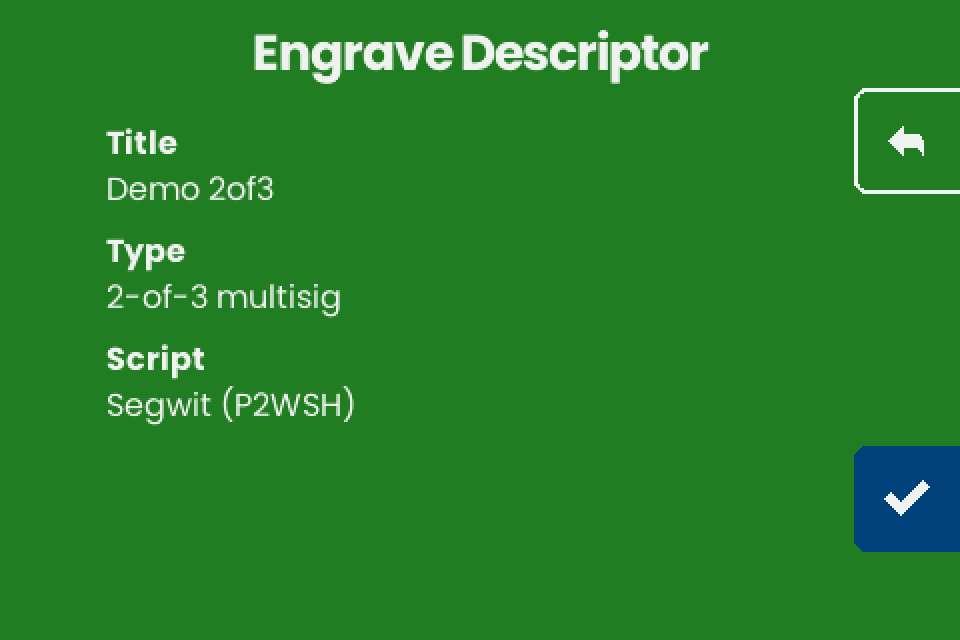 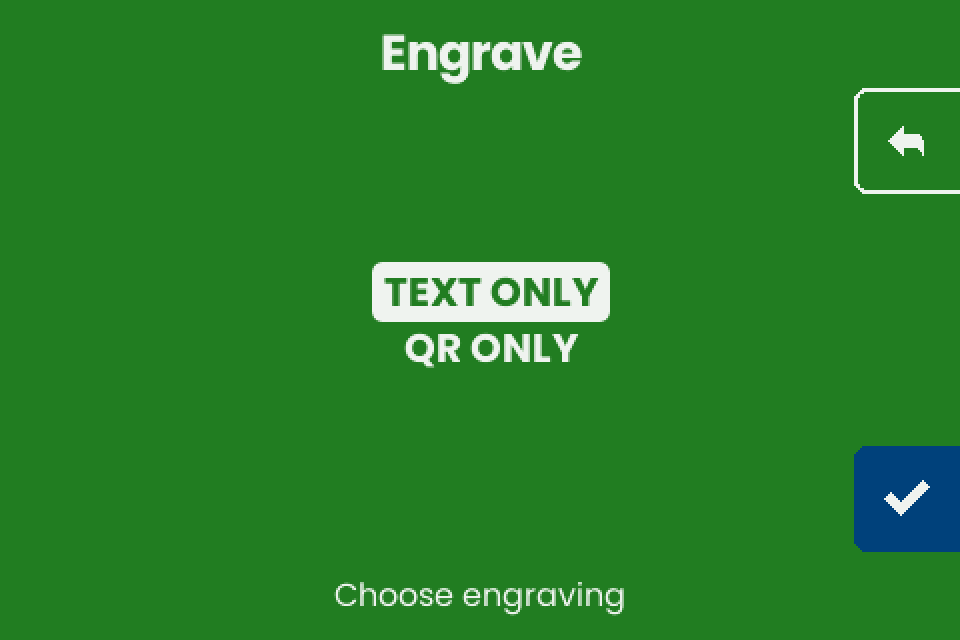 Single-sig gets all three layouts, multisig with up to four keys "TEXT ONLY" and "QR ONLY", five keys or more "Too Large" ([What fits on a plate](/doc/manual/multisig-and-fit#fit)). ## What gets engraved {#plates} | Input | Text on the plate | QR | Title | | --- | --- | --- | --- | | Seed (typed or NFC) | Master fingerprint, 8 hex digits (3.0 mm), above numbered words (4.1 mm); layout in [Seed plate](/doc/manual/titles-and-plate-layout#seed) | SeedQR, standard numeric form (unverified) | none | | Descriptor | The descriptor rebuilt as BIP380 text with key origins and checksum, hardened steps written as `h`, 3.8 mm, wrapped | The same descriptor with key origins, without checksum | none (unverified) | | codex32 share | The share in capitals, groups of 10 characters in two columns | The share | the 4-character share identifier, under the columns | The fingerprint on a seed plate is the one for an empty passphrase. Why a descriptor plate can differ from the export (`h` for `'`, no child path from Coldcard-style text, old QR codes): [Why the plate differs](/doc/manual/multisig-and-fit#differences).  ## Shares: codex32 and SLIP-39 {#shares} | Item | v1.4.3 | | --- | --- | | SLIP-39 | Not supported. The entry is switched off in the firmware. | | codex32 entry | "Input Seed" offers only "12 WORDS" and "24 WORDS". No codex32 keyboard, so a share arrives only over NFC. | | What it does with a share | Engraves one share as received. It does not create, split or combine shares. | | After a share arrives over NFC | Straight to "Engrave Plate", no confirmation screen (unverified). | | Back arrow on that "Engrave Plate" | Does not leave. The only ways out: finish the engraving or unplug the machine (unverified). | | A share that cannot be laid out | Returns to "Backup Wallet" without a message (unverified). |A codex32 share is secret like a seed: sent over NFC, it passes through the sending device (see Enter a seed on the touchscreen).
## NFC tags, cards and desktop writers {#tags} | Device | v1.4.3 | | --- | --- | | ISO 14443A Type 2 tag (NTAG21x), ISO 15693 Type 5 tag (ICODE SLIX, ST25TV) | Polled when no phone is in range (unverified). Write one Text record with NFC Tools, then hold the tag right of the display on "Backup Wallet". | | NTAG21x capacity | 48 to 888 bytes, which can be too small for a multisig descriptor (unverified per tag). | | Type 4 tag (DESFire, NTAG 424, ST25TA), Type 3 tag | Not read: the firmware has no reader for them (unverified). | | Card that is not a Type 2 or Type 5 NDEF tag, such as MIFARE Classic | Not expected to work (unverified). | | Desktop USB NFC writer aimed at the machine | The writer gets a scan error and beeps every second (unverified). Write the text to a tag and present the tag, or use a phone. | | Coldcard Mk4 or Q | Presents a Type 5 tag, which the reader accepts (unverified). Exports: [Send a descriptor from Coldcard Mk4 or Q](/doc/manual/descriptor-coldcard). | A tag keeps a readable copy of the keys; wipe or destroy it after use. ## Wallet exports at a glance {#wallets} Step by step: [Sparrow and Specter](/doc/manual/descriptor-desktop-wallets), [phone wallets](/doc/manual/descriptor-mobile-wallets), [Coldcard](/doc/manual/descriptor-coldcard); the transfer: [NFC Tools](/doc/manual/nfc-tools-transfer). | App and version | Export | Result on v1.4.3 (unverified) | Title | | --- | --- | --- | --- | | Sparrow 2.5.5 | Settings, "Descriptor:" field, right-click, "Copy Output Descriptor" | accepted; fails with `?bh=` or `?gl=` | none | | Sparrow 2.5.5, multisig | "Export...", then "Keystone Multisig", "Passport Multisig", "Coldcard Multisig" or "BlueWallet Vault Multisig", "Export File..." | accepted when all cosigners share one derivation path | wallet name, shortened to 20 characters | | Sparrow 2.5.5 | "Export...", "Specter Desktop" | accepted; fails with `?bh=` or `?gl=` | wallet name | | Sparrow 2.5.5 | "Export...", "Output Descriptor", "Export File..." | whole file fails; the first descriptor line alone is accepted | none | | Sparrow 2.5.5 | "Descriptor:" field, right-click, "Copy Value" | fails (keystore names, not keys) | | | Specter Desktop v2.1.11 | "Settings", "Export", "Go to export details", "Copy Wallet Data" | accepted, receive branch only | wallet name | | Nunchuk Android 2.9.0 | "Export wallet configuration", "Descriptor" | accepted, receive branch only | none | | Nunchuk Android 2.9.0, screen shown after wallet creation | "Descriptor" | accepted, but its `KEY/*` form describes other addresses: do not use | | | Nunchuk | "BSMS" | fails | | | BlueWallet 8.0.3, vault | "Export Coordination Setup" | accepted for P2WSH and P2SH vaults; fails for a wrapped (P2SH-P2WSH) vault; a cosigner on its own path silently gets the common path, so its engraved origin is wrong | vault name | | BlueWallet 8.0.3, single-sig | "Show Wallet XPUB" | bare key, do not use: `zpub` accepted without origin and engraved as `xpub`; `ypub` fails; `xpub` read as Legacy (P2PKH) | none | | Cove 1.4.0 | "Export Xpub", "QR Code", copy icon | accepted | none | | Bitcoin Keeper 2.5.13, vault | "Wallet configuration file", "Show QR" | accepted; miniscript vaults fail | none | | Bitcoin Keeper 2.5.13, hot wallet | "Show xPub" | read as Legacy (P2PKH): wrong script | none | | Envoy 2.3.5 | "Show Descriptor", "Segwit", "Copy" | accepted, receive branch only | none | | Blockstream app 5.7.0 | "Watch-only", "Output Descriptors" | fails as copied (two lines); accepted after deleting the second line | none | ## If it does not work {#troubleshooting} | Symptom | Cause | Fix | | --- | --- | --- | | "Unknown format", "Scan error", or nothing after an NFC write | The text matches no reading above, or the transfer failed | [Troubleshooting: NFC](/doc/manual/troubleshooting#nfc) | | "Too Large" with "The descriptor cannot fit any plate size." | The descriptor fits no layout | [What fits on a plate](/doc/manual/multisig-and-fit#fit) | | Any other message or fault | Varies | [Troubleshooting](/doc/manual/troubleshooting); power: [Power supply and first start](/doc/manual/power-and-first-start#troubleshooting) | --- # Send a descriptor from Coldcard Mk4 or Q over NFC **Draft, not yet verified on hardware.** A Coldcard Mk4 or Q sends a wallet descriptor to the SH II over NFC with no phone in between: tap it on the machine at "Backup Wallet" and "Engrave Descriptor" opens. Written for stock firmware v1.4.3, Coldcard Mk4 5.6.3 and Q 1.5.3Q.A Coldcard can push seed words over NFC and the machine accepts them, so type seeds on the machine instead, as in Enter a seed on the touchscreen. A descriptor is not a secret, but it reveals every address of the wallet.
## What you need {#requirements} - The SH II on stock firmware v1.4.3, showing "Backup Wallet" ([the only screen that listens](/doc/manual/nfc-tools-transfer#hold)) with "Firmware: v1.4.3" at the bottom right. - A Coldcard Mk4, out of its bumper sleeve, or a Q, with NFC on (off by default): **Settings** > **Hardware On/Off** > **NFC Sharing** > **Enable NFC**. ## Choose the export {#exports} | Coldcard export | Result | Machine shows | | --- | --- | --- | | **Advanced/Tools** > **Export Wallet** > **Descriptor**, **OK** for `<0;1>` | Parses. Use it for single-sig | "Engrave Descriptor": "Singlesig", the script, no "Title" | | **Settings** > **Multisig Wallets** > the wallet > **Coldcard Export**, P2WSH, cosigners on one path | Parses with a title. Plate without child path, which a Coldcard refuses on import ([phone route](#phone)) | "Engrave Descriptor": "Title" with the wallet name, "2-of-3 multisig", "Segwit (P2WSH)" | | **Multisig Wallets** > the wallet > **Descriptors** > **Export** | Parses [through a phone](#phone) only | "Engrave Descriptor": M-of-N, "Segwit (P2WSH)", "Nested Segwit (P2SH-P2WSH)" or "Legacy (P2SH)", no "Title" | | **Export Wallet** > **Key Expression** > **Segwit P2WPKH**, **Classic P2PKH** or **P2SH-Segwit** | Wrong plate: no child path | "Engrave Descriptor": "Singlesig", the script | | **Export Wallet** > **Export XPUB**, any item | Wrong wallet ([bare keys](/doc/manual/capability-sheet#formats)) | `xpub`: "Legacy (P2PKH)"; `zpub`: "Segwit (P2WPKH)"; both without fingerprint or path | | **Coldcard Export** of a legacy P2SH wallet | Firmware stops at the checkmark (unverified) | "Engrave Descriptor": "Script" "Unknown" | | **Descriptors** > **Export** tapped directly; **Descriptor** with (1); **Export XPUB** as `ypub`; **Key Expression** > **Multi P2WSH** or **Multi P2SH-P2WSH**; **Bitcoin Core**; **Dump Summary**; **Descriptors** > **View Descriptor** then (1); **Descriptors** > **Bitcoin Core**; **Coldcard Export** of a P2SH-P2WSH wallet or of cosigners on different paths | Fails | "Unknown format" | | JSON: **Sparrow**, **Cove**, **Nunchuk**, **Fully Noded**, **Theya**, **Bitcoin Safe**, **Generic JSON**, **Blue Wallet**, **Electrum Wallet**, **Wasabi Wallet**, **Unchained**, **Multisig Wallets** > **Export XPUB** | Fails. The machine skips JSON records | Nothing | ## Send a single-sig descriptor {#single} - On the Coldcard, open **Advanced/Tools** > **Export Wallet** > **Descriptor**. - Press **OK** (**ENTER** on the Q) for "(<0;1> notation)". Never press (1). - Choose **Segwit P2WPKH**, **P2SH-Segwit** or **Classic P2PKH**. "Script" will read "Segwit (P2WPKH)", "Nested Segwit (P2SH-P2WPKH)" or "Legacy (P2PKH)". - Press **(3)** at "press (3) to share via NFC", or the NFC key on the Q. - Hold the Coldcard over the panel right of the SH II display ([where](#hold)) until the machine changes screen.   ## Send a multisig with its name {#multisig} - On the Coldcard, open **Settings** > **Multisig Wallets** and pick the wallet, for example **2/3: Demo 2of3**, then **Coldcard Export**. - Press **(3)**, or the NFC key on the Q. - Hold the Coldcard over the panel right of the SH II display. ## Through a phone {#phone} Use this route for **Descriptors** > **Export**, when the direct tap fails, or for a plate that must restore into a Coldcard, which refuses the **Coldcard Export** plate with "Invalid subderivation path - only 0/* or <0;1>/* allowed" (other wallets unverified). The plate holds the receive path `/0/*` only ([what that changes](/doc/manual/multisig-and-fit#differences)). A single-sig **Descriptor** export takes the same route with nothing to delete. - On the Coldcard, open **Settings** > **Multisig Wallets** > the wallet > **Descriptors** > **Export**. - SD card: press **(1)**, open `desc-Seed words are typed on the machine only and never pass through a phone, a computer or a chat assistant. A descriptor is not a secret, but it reveals every address of the wallet.
## What you need {#requirements} - The SH II on stock firmware v1.4.3, showing "Backup Wallet", and a phone with NFC Tools ([write steps](/doc/manual/nfc-tools-transfer#write)). - Sparrow 2.5.5 or Specter Desktop 2.1.11 with the wallet open: single-sig, or a sorted multisig (`sortedmulti`) as P2WSH, P2SH-P2WSH or P2SH ([scripts](/doc/manual/capability-sheet#scripts)). ## Export from Sparrow {#sparrow} - Open the wallet and click **Settings** in the left column. - Right-click the **Descriptor:** field. - Click **Copy Output Descriptor**. The text goes to the clipboard; no dialog opens. 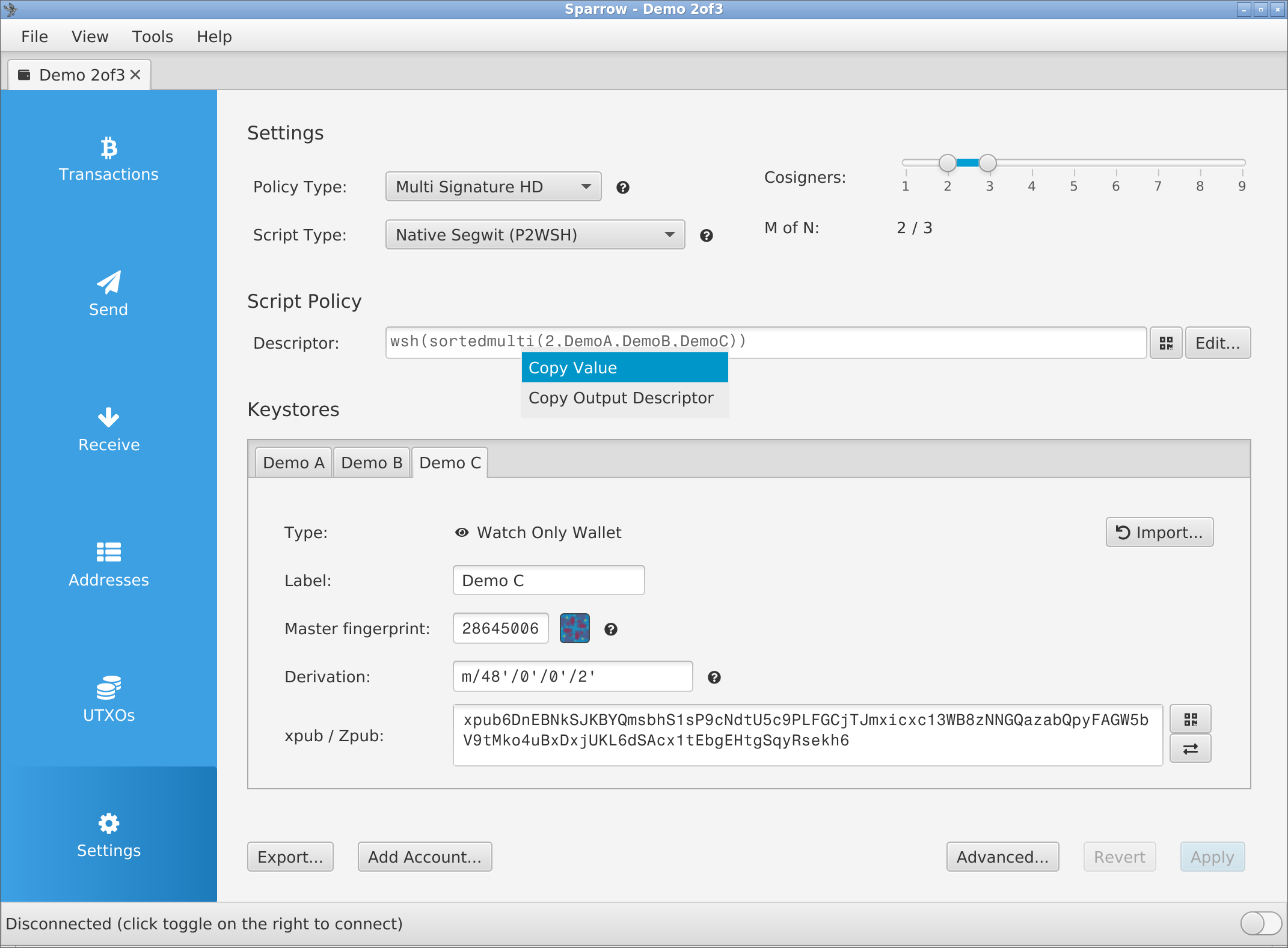 ### Remove `?bh=` or `?gl=` {#annotations} - Sparrow 2.5 and later write a BIP393 annotation before the `#`: `?bh=Seed words are typed on the machine only. They never pass through a phone, a computer or a chat assistant. Use only the exports named on this page: some wallet backups contain seed words, for example BlueWallet's "Export/Backup" for a vault that holds keys. To engrave a seed, see Enter a seed on the touchscreen.
A descriptor is not a secret: it cannot spend. It reveals every address of the wallet, and with them the balance and history. Keep it out of email, chat and cloud storage. ## What you need {#requirements} - The SH II on stock firmware v1.4.3 ("Firmware: v1.4.3" at the bottom right of "Backup Wallet"), on its power supply. - NFC Tools on the phone that holds the wallet. The full NFC Tools steps are on [Send a descriptor with NFC Tools](/doc/manual/nfc-tools-transfer). - A wallet the machine engraves: single-sig, or a sorted multisig as P2WSH, P2SH-P2WSH or P2SH. Taproot multisig, miniscript and unsorted `multi` give "Unknown format". ## Pick the export {#choose} Take the export that holds a descriptor with each key's origin: Nunchuk **Descriptor**, Cove **Export Xpub**, BlueWallet **Export Coordination Setup** (vaults), Keeper **Wallet configuration file**, Envoy **Show Descriptor**, Blockstream **Output Descriptors**. Only BlueWallet's vault text gives the machine a title among these apps. The overview of every app's result is on the [capability sheet](/doc/manual/capability-sheet#wallets). Do not send a bare key: BlueWallet **Show Wallet XPUB**, Keeper **Show xPub**, Blockstream **Extended Public Keys**. An `xpub` is read as "Legacy (P2PKH)" whatever the wallet is, and no bare key keeps its fingerprint and path on the plate ([Prepare the text](/doc/manual/nfc-tools-transfer#prepare)). ## Export from the wallet {#export} The labels are those of Nunchuk 2.9.0 for Android, Cove 1.4.0, BlueWallet 8.0.3, Bitcoin Keeper 2.5.13, Envoy 2.3.5 and the Blockstream app 5.7.0. All but Nunchuk's are taken from the apps' source code and are not yet checked on a phone. ### Nunchuk {#nunchuk} - Open the wallet, tap the three-dot menu at the top right, then **View wallet config**. - On "Wallet config", tap the three-dot menu again, then **Export wallet configuration**. - Under "Select the export format", tap **Descriptor**, then **Save file**.  - Nunchuk saves `Use a public test wallet for test runs. Seed words are typed on the machine only and never pass through a phone, a computer or a chat assistant.
## What you need {#requirements} - The machine on firmware v1.4.3 ("Firmware: v1.4.3" at the bottom right of the start screen). - A USB-C PD port with 20 V or 28 V at 5 A, preferably 28 V ([power](/doc/manual/power-and-first-start#power)). - The hex keys from the box, a drop of light oil, and low-strength threadlocker if you have it. - For test runs: a spare plate and a public test descriptor sent with [NFC Tools](/doc/manual/nfc-tools-transfer). ## How deep it engraves {#depth} The needle engraves about 0.3 to 0.4 mm deep into the 3 mm steel plate; 1.5 mm is out of reach. No setting changes the depth, and it does not drift with use. 2 mm plates engrave but warp ([Plates](/doc/manual/plates)). Strike strength follows the supply voltage, the highest the charger offers between 20 V and 28 V. At 20 V each strike gets a slightly longer pulse. 28 V engraves deeper and crisper (unverified). Full procedure: [Load a plate and engrave](/doc/manual/power-and-first-start#plate). - Plug the cable from the box into the charger port that offers 28 V. - Put a drop of light oil on the plate. - If steel has built up on the needle tip, scrape it off with a fingernail. - Close the lock firmly.  ## What the machine shows {#machine} - Homing: at power-up, before every job and after a job that ends normally, the head drives into its corner until both axes reach their stops, then to the plate's top-left corner. - "Engraving failed.": the head stays where it stopped. Next: [Retry and restart](/doc/manual/troubleshooting#retry). - Any other error: [Engraving errors](/doc/manual/troubleshooting#engraving).  ## Test a job without engraving a plate {#dry-run} v1.4.3 has no preview or dry-run mode (removed after v1.3.8). Test on the back of the test plate from the box, if yours came with one, or on a spare plate. Or unplug the solenoid. ### Unplug the engraving solenoid {#unplug} - Unplug the USB-C power. - Unplug the 2-pin engraving solenoid plug in the middle of the controller board. - Plug the power back in. - Start the job. The countdown shows how long the real job takes. - Watch where the head travels. It should run the whole job without striking (unverified on v1.4.3; it may stop with an error). - Unplug the power. - Plug the solenoid back in.  ## Take the play out of the axes {#mechanics} Each axis runs on a threaded shaft with a brass nut, driven by a stepper motor through a belt. Unplug the power first. ### Brass nuts: words fade toward the end {#brass-nut} - Loosen the set screw in the brass nut with the supplied hex key. - Turn the nut until the slack is gone. - Tighten the set screw again. Low-strength threadlocker on it is optional. - Do the same on the other axis.  ### Pulleys: homing error, or an axis stands still while its motor turns {#pulleys} - Move both axes by hand. They should turn freely. - Remove the left motor cover. - Plug in the power. - Watch the homing. A motor that turns while its axis stays still has a slipping pulley. - Unplug the power. - Tighten both set screws on each pulley with the smallest hex key, pressing the pulley against the frame. - If play remains, loosen the locking nut on the other side. - Tighten the pulley. - Tighten the locking nut.  ### Belts and Y-axis holder: wavy or wobbly text {#belts} - Tighten the set screw on the Y-axis holder. - Secure that set screw with threadlocker. - Loosen the four M3 screws that hold the belt's stepper motor. - Slide the motor along its slot to tension the belt. - Tighten the four screws. - Repeat on the other axis.  ### Needle and cables: the head moves but stops striking {#needle} - Press the engraving-head cable and the 2-wire cable fully into their sockets. - Move the head to the right side by hand. Neither cable should pull. - Unscrew the red head housing. The needle should move freely; spring resistance is normal. - Oil the needle. - Refit the housing. - Run a test job from a port that offers 28 V at 5 A. - If the head still stops, contact SeedHammer. It has sent replacement parts for this fault. ## If it does not work {#troubleshooting} | Symptom | Cause | Fix | | --- | --- | --- | | Shallower than the test plate from the box | A 20 V supply; the test plate was engraved at 28 V and may have run twice | Use a 28 V port ([depth](#depth)) | | Words fade toward the end | X-axis play, a loose brass-nut set screw or a loose lock | [Brass nuts](#brass-nut); close the lock firmly | | Wavy or wobbly text | A loose Y-axis holder set screw or a slack belt | [Belts and Y-axis holder](#belts) | | The head stops striking partway, often on the right or in the QR | A weak supply, a loose cable or a sticking needle | [Needle and cables](#needle) | | "Error: stepper: homing timed out" (older firmware: "Mjolnir2 homing timed out"), or the head scrapes the frame | A loose pulley | [Pulleys](#pulleys) | | The head starts over the orange frame at power-up | Normal | None | | A new machine leaves grease on the plate | Normal, in small amounts | None; the grease liquefies as the machine warms up | --- # Firmware Upgrade **Draft, not yet verified on hardware.** Install firmware v1.4.3 on a SeedHammer II from a Windows or Linux computer or an Android phone by copying one file. No flashing tool is needed. **Note:** An upgrade never asks for seed words, and the machine stores nothing an upgrade could lose ([What the machine keeps](/doc/manual/security-faq#storage)). Seed words are typed on the machine only and never pass through a phone, a computer or a chat assistant. ## What you need {#requirements} - A Windows or Linux computer, or an Android phone. A Mac connected directly shows no USB drive ([workaround](#troubleshooting)). - A USB cable to the machine's USB-C port. The computer or phone powers the machine during the upgrade. - The machine's USB-C PD supply, to read the version only ([Choose the power supply](/doc/manual/power-and-first-start#power)). - The file `seedhammerii-v1.4.3.uf2` ([Download the firmware](#download)). ## Check the installed version {#version} - Connect the PD supply and wait for the start screen "Backup Wallet". - Read the two lines at the bottom right, for example "Firmware: v1.4.3" and "Hardware: v1.5".  | On screen | Meaning | | --- | --- | | v2.x, for example "v2.0.4-beta" | An older beta. Releases restarted at v1. | | v1.4.1 (April 2026) or v1.4.2 (June 2026) | A descriptor's QR code leaves out the master fingerprints and the origin paths before each key. | | v1.4.3 (July 2026) | Latest release; the QR code keeps them. Update a new machine before its first plate. | | " (UNLOCKED)" after the hardware version | Secure boot is off, or the SeedHammer key is not the only valid boot key ([Read the lock mark](/doc/manual/security-faq#unlocked)). | ## Download the firmware {#download} - Open the firmware releases. v1.4.1, v1.4.2 and v1.4.3 are the signed, open-source SeedHammer II releases. Older `.img` releases are for the original SeedHammer. - Under v1.4.3, open **Assets** and download `seedhammerii-v1.4.3.uf2`. - Optional: compare the file's SHA-256 with `07bdb759041a08307cf151f94fb77d2c21444418ccc0bf04b432015cbbcb3794`. Windows: `certutil -hashfile seedhammerii-v1.4.3.uf2 SHA256`. Linux: `sha256sum seedhammerii-v1.4.3.uf2`. Mac: `shasum -a 256 seedhammerii-v1.4.3.uf2`. **Note:** From here on the computer or phone can stay offline. To rebuild a release or sign your own builds, see [Rebuild a release](/doc/manual/security-faq#reproduce) and [Use your own signing key](/doc/manual/security-faq#own-key). ## Put the machine into upgrade mode {#connect} In upgrade mode the screen shows no picture (dark, or backlight only) and the machine appears as a USB drive named `SHII` or the chip's default name (unverified). Start with the PD supply unplugged and the screen dark. ### Without the button (v1.4.2 and v1.4.3) {#no-button} From v1.4.2 on, the firmware restarts into upgrade mode by itself on a port that cannot offer 20 V to 28 V at 3 A or more (unverified). Most computer and phone ports cannot. - Connect the machine's USB-C port to the computer or phone. The USB drive appears. ### With the firmware button {#button} Use the button on firmware older than v1.4.2, when the start screen appears instead of a drive, or when the machine does not start. The chip's boot ROM reads it, so it works whatever firmware is installed. The firmware button (RP2350 BOOTSEL) sits on the underside near the hammerhead and carries the label "Hold button while connecting the USB cable to update firmware"; the other button, "RESET", only restarts the board (labels and position unverified). Find it by its label, not by a button number in a photo.  - Connect the cable to the computer or phone, not yet to the machine. - Press and hold the firmware button. - While holding it, connect the cable to the machine. - Release the button when the USB drive appears. ## Copy the firmware {#upload} - Copy `seedhammerii-v1.4.3.uf2` onto the USB drive (drag it, or use a file manager on Android). - Wait until the drive disappears. The installation is complete. - Connect the PD supply in place of the cable.  ## What the machine shows {#machine} - During and after the copy: a dark screen, or backlight only. Normal on USB power. - On a computer or phone port the drive may appear again, because the new firmware restarts into upgrade mode (unverified). The upgrade has worked. - On the PD supply: "Backup Wallet" with "Firmware: v1.4.3" at the bottom right. A dark screen here: [Power faults](/doc/manual/power-and-first-start#troubleshooting). ## If it does not work {#troubleshooting} | Symptom | Cause | Fix | | --- | --- | --- | | No USB drive on a Mac | Apple USB controllers do not work with the RP2350 boot mode. This cannot be fixed on SH II boards. | A USB-C to USB-A adapter on the Mac, then a USB-A to USB-C cable. Or use Windows, Linux or Android. | | No USB drive on Windows, Linux or Android | Without the button, only v1.4.2 or later enters upgrade mode. | Use [the firmware button](#button). A computer works more reliably than a phone. | | The start screen appears instead of a drive | The port offered enough power, so the firmware started normally. | Use [the firmware button](#button). | | The USB drive appears on the PD supply | The supply does not offer 20 V to 28 V at 3 A or more. | Use one that offers 20 V or 28 V at 5 A ([Choose the power supply](/doc/manual/power-and-first-start#power)). | | No start after an upgrade, even on a suitable PD supply | | Enter upgrade mode with [the firmware button](#button) and copy the release file again. | | Garbled display after an upgrade | The screen's flat cable is loose. | [Screen and touch](/doc/manual/troubleshooting#screen). | | A descriptor that fitted on v1.4.2 shows "Too Large" on v1.4.3 | v1.4.3 keeps the master fingerprints and origin paths, so the QR code is larger. | Option: engrave it on v1.4.2. Secure boot may refuse the downgrade (unverified). That QR code restores with extra steps: [Plates from older firmware](/doc/manual/recovery-from-plates#old-plates). | --- # Hardware, spare parts and self-builds **Draft, not yet verified on hardware.** Wear, heat and noise, spare parts, the controller board and the open design files of the SeedHammer II on stock firmware v1.4.3. The SH II is sold out and no longer produced.Seed words are typed on the machine only and never pass through a phone, a computer or a chat assistant. A descriptor holds no secret and reveals every address of the wallet.
## What you need {#requirements} - The USB-C power cable unplugged before you touch any plug inside the machine. - The hardware line from the start screen, for example "Hardware: v1.5"; quote it when you ask for a spare part. - For a board swap: a computer to upgrade the new board ([Firmware upgrade](/doc/manual/firmware-upgrade)). - For a self-build: the hardware repository.  ## What wears, and how long it lasts {#wear} | Item | Figure | What to do | | --- | --- | --- | | Machine | Hundreds of plates, a design target; SeedHammer's own runs had not reached it by 2025-07. | | | Carbide needle tip | 500 to 1000 plates without dulling (unverified). | | | Steel on the tip | Can build up. | Scrape it off. Put a drop of light oil on the plate before engraving. | | Sticking needle, wobbly text, fading words, homing errors | Mechanical faults, separate from wear. | [Engraving quality](/doc/manual/engraving-quality#mechanics) | ## Heat and noise {#heat-noise} The "Engrave Plate" screen warns before every job: "The process is loud, use hearing protection." | Item | Figure | What to do | | --- | --- | --- | | Power while engraving | Not much above 30 W on a meter sampling about once a second (unverified). Short peaks can be far higher. | Size the supply by [Choose the power supply](/doc/manual/power-and-first-start#power), never by this figure. | | Box lined with sound-deadening mat | Quieter; in one such box the hammerhead reached about 90 °C (unverified). | Let it cool between runs. | ## Spare parts {#spares} Every part except the hammerhead is a standard part or can be made from the repo files. | Part | Where it comes from | In the repo | | --- | --- | --- | | Hammerhead (electric coil, carbide tip, 2-pin plug) | SeedHammer; stock unverified. A look-alike marketplace head was pneumatic. | specs/hammerhead.pdf | | Controller board | SeedHammer, in small batches (unverified), or made from the repo files. Production boards: made and assembled by JLCPCB. | mainboard/pcb | | Display | ER-TFT035IPS-6 with capacitive touch, from buydisplay.com. The resistive-touch variant does not work with the firmware. | README | | Stepper motors, bearings, rods, lead screws, belts, pulleys, bushings | Standard parts, in the parts list. | shii/bom/bom.csv | | Screws and nuts | ISO and DIN standard fasteners. | shii/bom/fasteners.csv | | Frame and other custom parts | FDM-printed, CNC-milled or lathe-machined from the STEP files; the parts list gives filament, layer and infill for printed parts. | shii/cad | | Plates | [Plates](/doc/manual/plates) | | ## Take out the controller board {#board} The controller board carries the microcontroller, USB-C power negotiation, stepper drivers, hammerhead supply, display connection and NFC reader. It unplugs, so you can keep, destroy or swap it without taking the frame apart. - Unplug the USB-C power cable from the machine. - Disconnect the plugs from the board. - Pull the right side of the board out. - Slide the left side free without straining the USB-C socket. The repo design has two 4-pin motor plugs (`J1` X, `J5` Y), the 2-pin solenoid plug (`J8`), the display's flat cable and two 3-pin connectors; the count on a shipped machine is unverified.   Board buttons: [the firmware button](/doc/manual/firmware-upgrade#button). ### Fit a board {#fit-board} - Upgrade a replacement board before use: [Firmware upgrade](/doc/manual/firmware-upgrade). - Fit the board in the reverse order of removal (order and fixings on a shipped machine unverified). - Push each plug fully home. - Connect the power supply. The start screen "Backup Wallet" shows "Firmware: v1.4.3" bottom right. ### Test without wasting a plate {#test} v1.4.3 has no dry-run setting. - Unplug the engraving solenoid: [Unplug the engraving solenoid](/doc/manual/engraving-quality#unplug). - Send a public test descriptor and watch the job run without strikes. Never test with a real seed. ## Keep, swap or destroy the board {#board-security} You never have to replace the board: the firmware writes nothing durable. When to keep, swap or destroy it: [Lending, selling and travel](/doc/manual/security-faq#lending); what each chip holds: [What the machine keeps](/doc/manual/security-faq#storage). ## Build or repair from the open files {#self-build} The design files in the hardware repository are public domain. | Item | Detail | | --- | --- | | Board | KiCad schematic and PCB in `mainboard/pcb`; the board's components are listed only there. The README explains how to generate the production files and lists the JLCPCB settings. Its command says `cd pcb`; run it in `mainboard/pcb`. | | Mechanics | STEP files in `shii/cad`; drawings `shii/cad/clampsled.pdf`, `shii/cad/nema17-stepper.pdf`, `specs/hammerhead.pdf`. Parts-list row of the clamp sled drawing unverified. | | Parts lists | `shii/bom/bom.csv` (machine parts by assembly group), `shii/bom/fasteners.csv` (screws and nuts). The counts differ between the two in places. | | Firmware | Install a release ([Firmware upgrade](/doc/manual/firmware-upgrade)) or build from source and compare ([Rebuild a release](/doc/manual/security-faq#reproduce)). On a repo-built board a release file boots and shows " (UNLOCKED)" (unverified). | | Kit, assembly guide | None. No assembly instructions are planned for the SH II. | | A computer instead of the board | Not possible: the board also handles power, motors and hammerhead. | | Early boards | Can differ: board parts changed during production, and the repo holds the latest design. | ## If it does not work {#troubleshooting} | Symptom | Cause | Fix | | --- | --- | --- | | The screen stays black. | No supply offer of 20 V to 28 V at 3 A or more. | [Power faults](/doc/manual/power-and-first-start#troubleshooting) | | The screen is garbled after the board was out. | Loose display ribbon. | [Reseat the ribbon](/doc/manual/troubleshooting#screen) | | The head moves but does not strike, or stops striking partway. | Loose 2-pin engraving solenoid plug, sticking needle, or weak supply. | [Needle and cables](/doc/manual/engraving-quality#needle) | | "Engraving failed." with "Error: stepper: homing timed out". | Loose pulley set screw or weak supply. | [Pulleys](/doc/manual/engraving-quality#pulleys) | | The start screen shows " (UNLOCKED)". | Secure boot is off, or a boot key other than the SeedHammer key is valid. | If you did not add a key: [Read the lock mark](/doc/manual/security-faq#unlocked) | --- # What fits on a plate, and multisig without sharding **Draft, not yet verified on hardware.** Back up a multisig wallet on the SH II (stock firmware v1.4.3) as separate jobs: each cosigner seed on its own plate, then the whole descriptor, as text or QR code, on the plates you choose. The machine has no multisig menu and, unlike the original SeedHammer, never splits a descriptor across plates.Type seed words on the machine only; they never pass through a phone, a computer or a chat assistant.
## What you need {#requirements} - One blank plate and the written seed words for each cosigner, and a free face for each copy of the descriptor. - The descriptor as text on a phone with NFC Tools: [NFC Tools transfer](/doc/manual/nfc-tools-transfer), [desktop wallets](/doc/manual/descriptor-desktop-wallets), [phone wallets](/doc/manual/descriptor-mobile-wallets). - A sorted multisig (`sortedmulti`): P2WSH, P2SH-P2WSH or P2SH. Others give "Unknown format". - A descriptor string, never a bare key: a bare key loses its script and origin ([why](/doc/manual/capability-sheet#formats)). For P2SH-P2WSH or P2SH, no "Coldcard Export" either: the P2SH-P2WSH one gives "Unknown format", the P2SH one stops the firmware (unverified). ## Plan where the descriptor goes {#plan} A descriptor is not a secret and cannot spend, but it reveals every address and balance of the wallet. Without it, spending can be blocked, so it goes on steel. Each descriptor job engraves the whole descriptor, unencrypted, on one face. No single plate can spend from a 2-of-3; you choose which plates carry the descriptor: | Layout | You restore with | One plate found by someone else shows | | --- | --- | --- | | Descriptor on the back of every seed plate | any 2 of the 3 plates | one seed, plus every address and balance of the wallet | | Descriptor on plates of its own, stored apart from the seeds | 2 seed plates and 1 descriptor plate | a seed plate: one seed only; a descriptor plate: every address, no seed | ## Engrave each seed {#seeds} Engrave each seed as a normal seed job on its own plate: [Enter a seed on the touchscreen](/doc/manual/seed-entry). v1.4.3 has no passphrase screen. The fingerprint above the words is that of the seed without a passphrase, so a passphrase cosigner's plate will not match the descriptor. Store the passphrase some other way. ## Engrave the descriptor {#descriptor} - Prepare the text: nothing from `?` on, no line break after it ([how](/doc/manual/nfc-tools-transfer#prepare)). - Bring the machine to "Backup Wallet". It listens for NFC on this screen only. - In NFC Tools, write the text as a **Text** record, never URL, with the phone flat on the panel right of the display. - On "Engrave Descriptor", compare **Type** and **Script** with your wallet, such as "2-of-3 multisig". 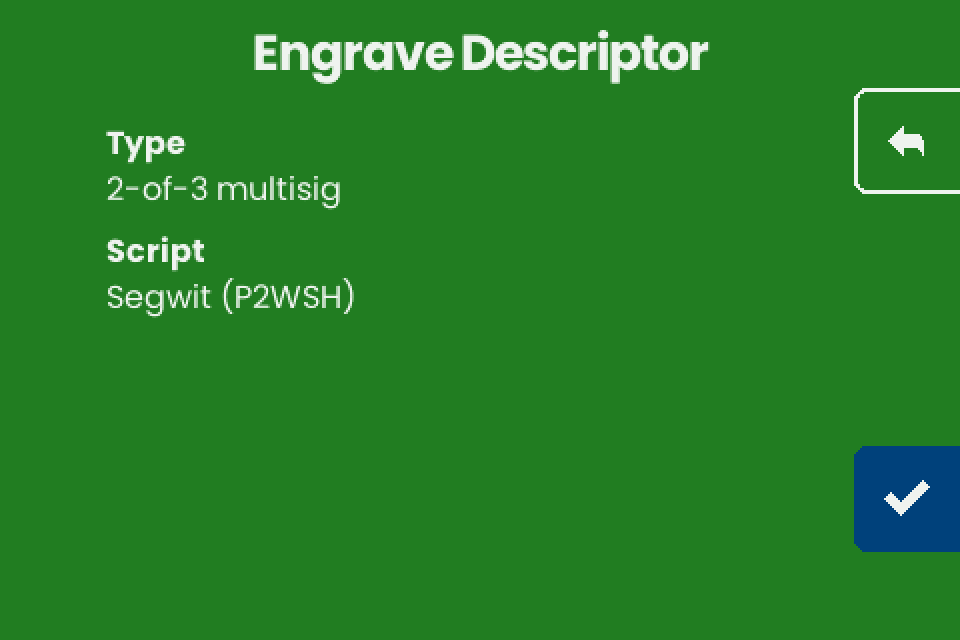 - Tap the checkmark (bottom right). - On "Engrave" ("Choose engraving"), tap **TEXT ONLY** or **QR ONLY**, then the checkmark.  - For the back of a seed plate, turn the plate over (seating face down and damage to the seed face unverified). - On "Engrave Plate", insert the plate and engrave as in [Load a plate](/doc/manual/power-and-first-start#plate). - For every further copy, write the descriptor again on "Backup Wallet". The machine asks for no seed before "Engrave Descriptor" and never compares the descriptor with seeds engraved before (unverified). ## What fits on a plate {#fit} After the checkmark on "Engrave Descriptor", the machine tries three layouts on one face and offers those that fit: **TEXT + QR**, **TEXT ONLY**, **QR ONLY**. If none fits: "Too Large" and "The descriptor cannot fit any plate size." No title is engraved ([Titles](/doc/manual/titles-and-plate-layout#titles)). - Text: the rebuilt descriptor with each key's fingerprint and path, and the checksum (`#` and 8 characters). - QR code: the same descriptor without the checksum, at error correction level L (the lowest). - Fit is decided on the rebuilt descriptor: removing spaces, line breaks, JSON keys or the checksum changes nothing. - Fit counts keys and ignores the threshold: a 2-of-5 is as long as a 3-of-5. - Fit on older firmware does not carry over: the v1.4.3 QR code keeps fingerprints and paths and is larger. | Wallet, every key with fingerprint and path | Layouts offered (unverified) | | --- | --- | | Single-sig (`wpkh`, `pkh`, `tr` with one key) | **TEXT + QR**, **TEXT ONLY**, **QR ONLY** | | Multisig with 2 to 4 keys (1-of-2, 2-of-3, 2-of-4, 3-of-4) | **TEXT ONLY**, **QR ONLY** | | Multisig with 5 or more keys (2-of-5, 3-of-5, 3-of-6) | "Too Large" | Use two faces for both forms of a multisig descriptor. Text is read by eye and its checksum catches a typing mistake; a QR code needs a camera that reads steel ([recovery](/doc/manual/recovery-from-plates)). Demo 2-of-3, before homing: about 11 minutes as **TEXT ONLY**, 39 as **QR ONLY** (unverified). ## Why the plate differs from what you sent {#differences} - **`h` instead of `'`.** The machine writes hardened steps as `h` (`48h`). Same keys and addresses, but the checksum covers every character, so a descriptor sent with apostrophes (`48'`, as Nunchuk writes) comes back with another checksum (unverified). Descriptor strings from Sparrow, Specter and Coldcard use `h` and come back unchanged (unverified). - **No `/<0;1>/*` or `/0/*`.** Coldcard-style setup text (Coldcard, BlueWallet vault, Sparrow's Coldcard, Keystone and Passport Multisig exports) and Sparrow's Specter Desktop export carry no child path, so the plate has none. A Coldcard refuses it on import ("Invalid subderivation path - only 0/* or <0;1>/* allowed"); Nunchuk too (unverified). For a Coldcard restore, send a descriptor with `/<0;1>/*` on every key. - **Plates from v1.4.1 and v1.4.2.** Their QR code left out the master fingerprints and the origin paths before each key; like v1.4.3, it carried no checksum. The addresses are the same. Some hardware signers need the full key origins to sign: [Plates from older firmware](/doc/manual/recovery-from-plates#old-plates). To check any plate, let your wallet derive the first receive address from the engraved text and compare it. ## If it does not work {#troubleshooting} | Symptom | Cause | Fix | | --- | --- | --- | | "Too Large" / "The descriptor cannot fit any plate size." | Five or more keys with full origins on v1.4.3 ([table](#fit)). Dropping key origins leaves a descriptor some signers refuse. | Engrave the seeds. Keep the descriptor in another durable form. | | Only **TEXT ONLY** and **QR ONLY** offered | Normal for multisig on v1.4.3. | Use two faces for both. | | "Unknown format" with a multisig descriptor | Unsorted `multi`, taproot multisig or miniscript; Coldcard-style text with a second `Derivation:` line; `Format: P2SH-P2WSH` (a P2SH-P2WSH "Coldcard Export" or a wrapped BlueWallet vault). | Export a plain descriptor with every key's origin. Every cause: [Troubleshooting](/doc/manual/troubleshooting#nfc). | | NFC Tools shows an error after the write | The phone moved, or the machine answered late (after more than about 77 ms, while the screen redraws). | Harmless if the machine shows "Engrave Descriptor" ([NFC Tools](/doc/manual/nfc-tools-transfer#troubleshooting)). | | Fingerprint on a seed plate differs from the descriptor | The cosigner uses a passphrase (the plate carries the fingerprint without it), or the seed belongs to another wallet. | See [Engrave each seed](#seeds). | | Engraved checksum differs from your wallet's | Your wallet wrote apostrophes ([why](#differences)). | Compare first receive addresses. | --- # Send a descriptor to the SH II with NFC Tools (iPhone and Android) **Draft, not yet verified on hardware.** Send a wallet descriptor from an iPhone or Android phone to the SH II with NFC Tools, on stock firmware v1.4.3. The machine has no descriptor menu: on its start screen, "Backup Wallet", it opens "Engrave Descriptor" by itself when a descriptor arrives.Seed words are typed on the machine only and never pass through a phone, a computer or a chat assistant (Enter a seed on the touchscreen). A descriptor is not a secret and cannot spend. It reveals every address of the wallet, and with them the balance and history: keep it out of email, chat and cloud notes.
## What you need {#requirements} - The SH II on stock firmware v1.4.3 ("Firmware: v1.4.3" bottom right), on its power supply, showing "Backup Wallet". - An iPhone 7 or later with iOS 15.6 or later (NFC is always on), or an Android phone with NFC switched on in the phone's settings, in the section for connections. - NFC Tools by WAKDEV (App Store, Google Play). - The descriptor on the phone's clipboard: from [phone wallets](/doc/manual/descriptor-mobile-wallets) or [Sparrow and Specter](/doc/manual/descriptor-desktop-wallets). - No phone? A Coldcard sends on its own: [Coldcard](/doc/manual/descriptor-coldcard). Tags and desktop writers: [capability sheet](/doc/manual/capability-sheet#tags). ## Prepare the text {#prepare} Copy one text in one of these forms before you open NFC Tools. - A plain descriptor on one line, for example `wsh(sortedmulti(2,[73c5da0a/48h/0h/0h/2h]xpub.../<0;1>/*,...))#spmyt389`, with no space or line break before or after it. A trailing line break gives "Unknown format". - If it contains `?` (Sparrow 2.5 and later add `?bh=` or `?gl=`), delete everything from `?` to the end, checksum included (unverified). The machine engraves its own checksum. Never retype key characters. - JSON with a `"label"` and a `"descriptor"` field, as Specter exports it. Sparrow's **Specter Desktop** file with `?bh=` or `?gl=`: [delete the annotation](/doc/manual/descriptor-desktop-wallets#annotations). - Coldcard or BlueWallet multisig text with a `Name:` line. - Never a bare key such as an `xpub`; send a descriptor with key origins ([why](/doc/manual/capability-sheet#formats)). ## Write the descriptor with NFC Tools {#write} - Open **NFC Tools**. - Tap **Write** (Android: the **WRITE** tab). - Tap **Add a record**. - Tap **Text** ("Add a text record"). - Paste the descriptor into **Enter your text**. - Tap **OK** (Android: the back arrow). - Make sure the list shows exactly one record, "Text", with your descriptor (Android: with its size). - To keep the phone offline, switch on airplane mode now (unverified). 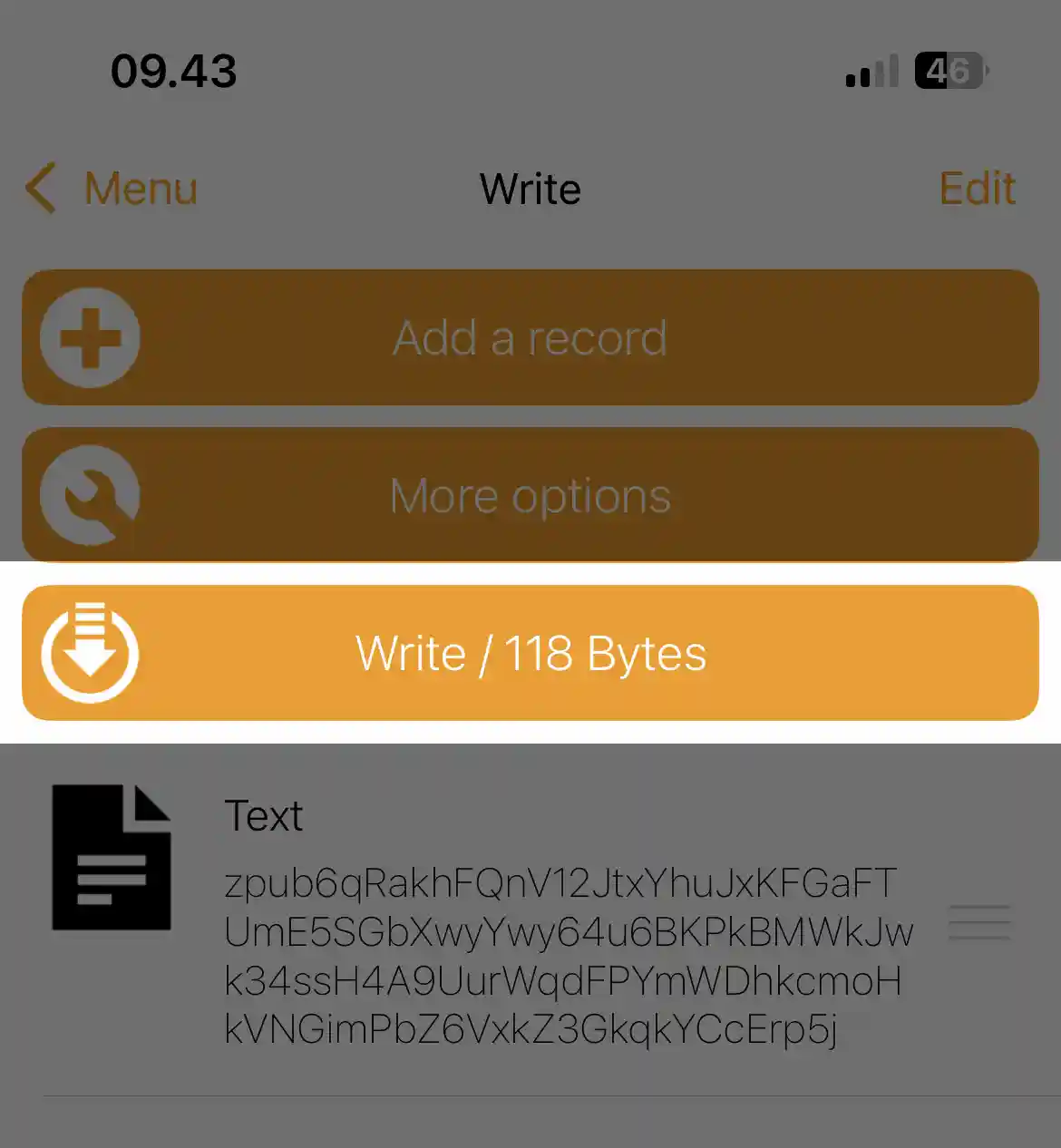 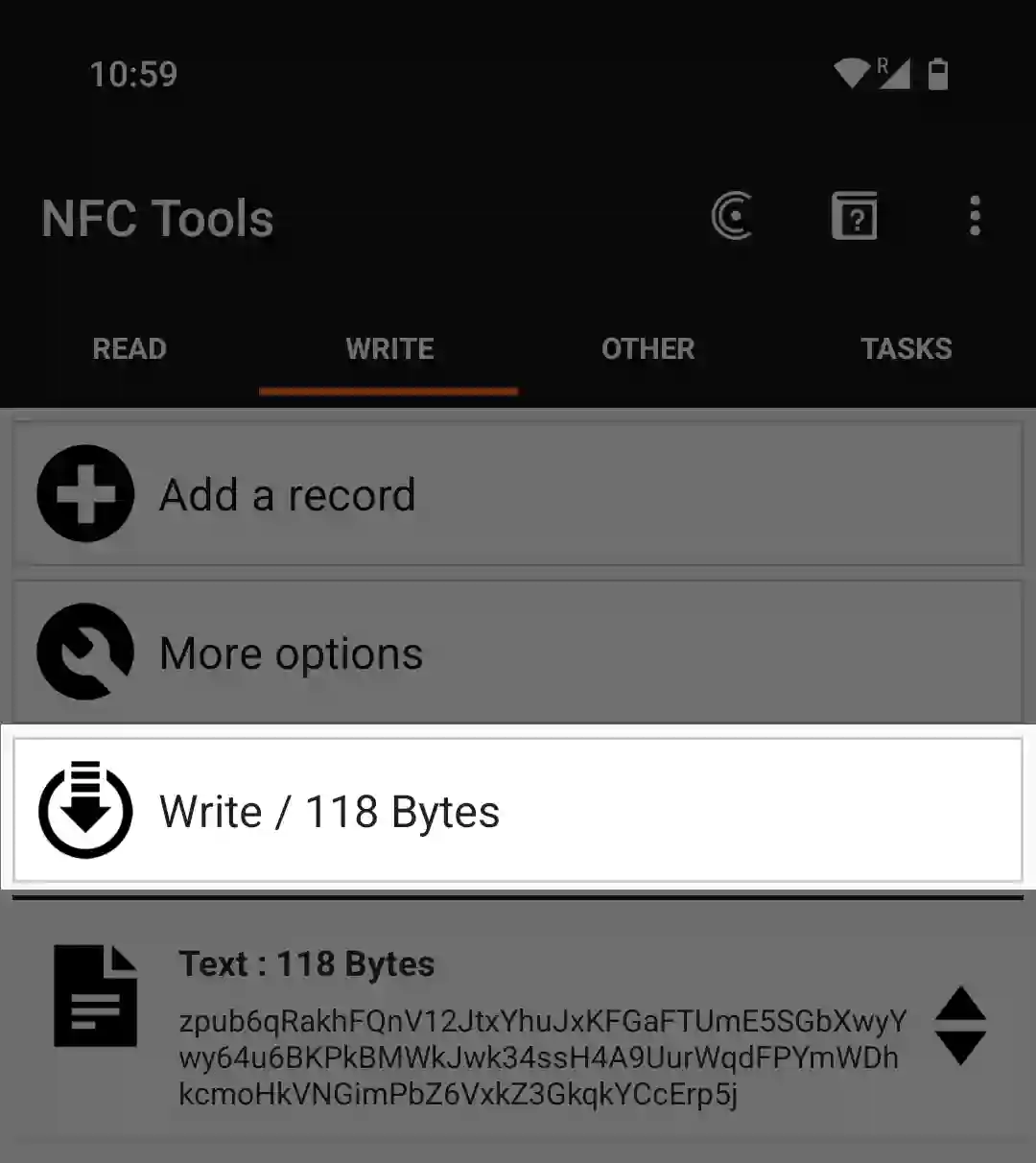 - Tap **Write** beside the machine. iPhone: the scanning sheet closes after 60 seconds, or when you leave NFC Tools. Android: the dialog "Write on NFC Tag" opens with "Approach an NFC Tag". - Hold the phone over the panel right of the display ([where](#hold)) until the iPhone sheet shows the write is done, or Android shows "Write complete!" (tap **OK**). ## Where to hold the phone {#hold} - Leave the machine on "Backup Wallet"; NFC is off on every other screen. - Lay the phone's NFC zone flat over the panel right of the display, not over the display, and keep still. iPhone: the top edge of the back. Android: near the top or the middle of the back, by model.  ## What the machine shows {#machine} - "Scanning..." on the start screen for about one second while data arrives. Watch the machine during the write. - "Engrave Descriptor" when it accepts the text. Phone success only means the bytes arrived; this screen means carry on. - "Title", only for a JSON `label` or Coldcard `Name:`; shown, not engraved ([why](/doc/manual/titles-and-plate-layout#titles)). - "Type": "Singlesig", or for example "2-of-3 multisig". Testnet keys add " (testnet)". - "Script": for example "Segwit (P2WSH)" or "Segwit (P2WPKH)". - No addresses, fingerprints or xpubs show. If Type or Script is wrong, tap back (top of the right edge). 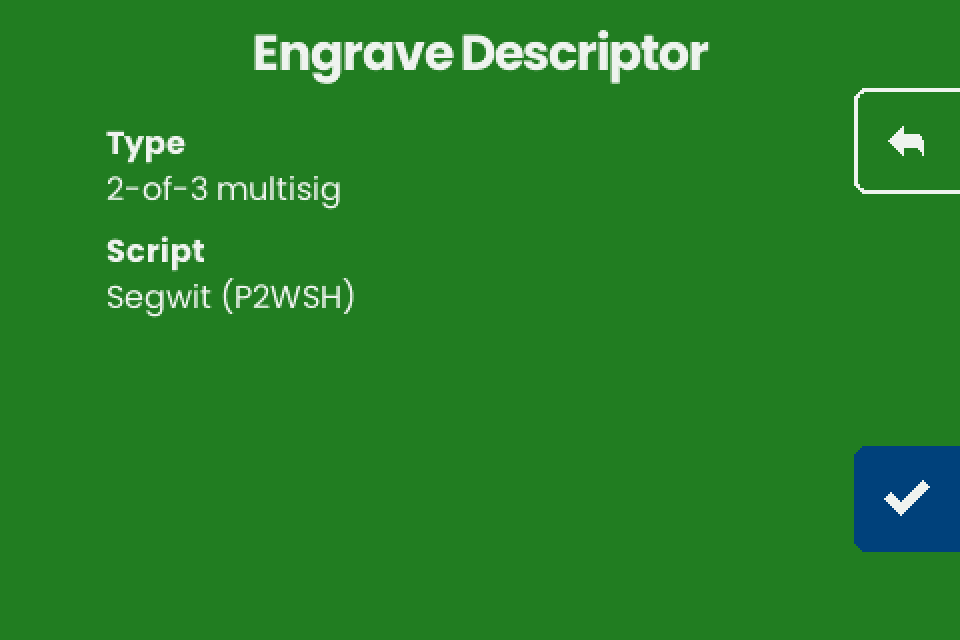 - Tap the checkmark (bottom right). "Engrave" lists the layouts that fit ([fit](/doc/manual/multisig-and-fit#fit)). - Compare the plate with your wallet by first receive address ([why](/doc/manual/multisig-and-fit#differences)). - Delete the record from the NFC Tools write list when you are done. ## If it does not work {#troubleshooting} | Symptom | Cause | Fix | | --- | --- | --- | | The phone never finishes the write, or the iPhone sheet closes with an error | The machine is not on "Backup Wallet", the phone is not over the panel, a case is in the way, or NFC is off on Android. iPhone: the 60-second limit ran out, or NFC Tools went to the background | Fix it, then tap **Write** beside the machine and stay in NFC Tools | | The phone reports success, the machine shows nothing | The record is not Text, or is empty | Use one **Text** record | | NFC Tools reports an error at the end of the write, or the write stops part way | The phone moved, or the machine answered late: on stock v1.4.3 its emulated tag promises an answer within about 77 ms (FWI 8), and one step of a large write sometimes takes longer while the screen redraws | An error shown by NFC Tools after the write is harmless when the machine shows the next screen, "Engrave Descriptor". If it shows "Backup Wallet", hold still and write again | | "Unknown format" flashes for a second | A "URL / URI" record, which adds `https://` (the Android default), or a space or line break around a one-line descriptor | Use a **Text** record with nothing around the text. Other causes: [Troubleshooting](/doc/manual/troubleshooting#nfc) | | "Scan error" | The transfer broke off | Write again, or see [Troubleshooting](/doc/manual/troubleshooting#nfc) | | "Too Large" | The descriptor does not fit a plate; not a transfer problem | See [What fits on a plate](/doc/manual/multisig-and-fit#fit) | | The machine takes an old descriptor | NFC Tools still holds an earlier record (unverified) | Delete it and keep one record | --- # Plates: which fit, specs and durability **Draft, not yet verified on hardware.** Choose plates that fit the SeedHammer II and know how an engraved plate holds up. Stock firmware v1.4.3 knows one plate, 85 x 85 mm: there is no plate-size screen, the machine does not detect which plate is loaded, and each job engraves one face.Seed words are typed on the machine only and never pass through a phone, a computer or a chat assistant. An engraved seed plate gives full access to the wallet, so store it like the seed; a descriptor plate holds no secret and reveals every address of the wallet.
## What you need {#requirements} - A SeedHammer II on stock firmware v1.4.3: the start screen shows "Firmware: v1.4.3" at the bottom right. - Square 85 x 85 mm plates: SeedHammer II plates or SH02 steel plates, from the SeedHammer shop or a reseller. ## Which plates fit {#fit} | Plate | Fits | Notes | | --- | --- | --- | | SeedHammer II plate | yes | square, 85 x 85 mm, no holes | | SH02 plate (original SeedHammer) | yes | square, with or without corner holes; the lock holds the plate and the holes go unused; hole clearance unverified | | SH01 plate (original SeedHammer) | no | small; support is not planned | In v1.4.3 descriptor text keeps a 10 mm square clear in each corner: lines within 10 mm of the top or bottom edge are shortened at both ends. A "QR ONLY" plate has no such gap. Its QR is centred, and a 2-of-4 QR is 72.9 mm wide, so it comes within about 6 mm of every edge and reaches into the corners.  ## Home-made and other plates {#custom} | Plate | Fits | Notes | | --- | --- | --- | | Home-made plate | if it matches the [official plate](#specs) | | | 2 mm plate | engraves (unverified) | warps somewhat; use 3 mm | | Grade 2 titanium plate | engraves (unverified) | dark, so the engraving is harder to read | | Smaller plate | needs a home-made holder | gets the 85 x 85 mm layout from the same fixed start point, not scaled or moved; run the job with the solenoid unplugged first ([test](#test)) and watch that the head stays over the plate, or use 85 x 85 mm plates | ## Specifications {#specs} | | Official plate | | --- | --- | | Size | 85 x 85 mm, square | | Thickness | 3 mm (unverified) | | Material | 316L stainless steel, 1.4404 (unverified) | | Largest engraving area | 79 x 79 mm: the firmware keeps 3 mm free along every edge | | Per job | one face of one plate; no flow asks for a second side; what fits: [What fits on a plate](/doc/manual/multisig-and-fit#fit) | | Engraving depth | about 0.3 to 0.4 mm, 1.5 mm is out of reach; deeper on a 28 V supply than on 20 V, see [Engraving quality](/doc/manual/engraving-quality) | ## Durability {#durability} - A house fire reaches about 800 °C; 316L steel melts at about 1375 to 1400 °C (temperatures only, no fire test of an engraved plate). - A second pass of the same job engraves slightly deeper and wider. A finished job returns to the start screen, so a second pass of a seed means typing it again ([Retry, resume and restart](/doc/manual/troubleshooting#retry)). ## Test without wasting a plate {#test} **Important:** Run every test job with a public test wallet, such as the 12-word test seed ("abandon" eleven times, then "about") or a descriptor made from it. Never test with your own seed: each test plate is one more copy of it. - To test with engraving, engrave the job on a spare plate, over an engraved plate, or on the back of the test plate that came with the machine (if any). - To test without engraving (v1.4.3 has no dry-run setting; v1.3.8 was the last release with one), unplug the 2-pin engraving solenoid plug as in [Unplug the engraving solenoid](/doc/manual/engraving-quality#unplug) and watch where the head travels.  ## Load a plate {#load} Every seed or descriptor job ends on **Engrave Plate**: "Insert a blank plate and close the lock." - Lay the plate in the holder. - Close the lock. - Hold the hammer button at the bottom right for 1 second. The rest of the job, including stop and resume, is in [Load a plate and engrave](/doc/manual/power-and-first-start#plate).   ## If it does not work {#troubleshooting} | Symptom | Cause | Fix | | --- | --- | --- | | "Too Large" / "The descriptor cannot fit any plate size." | The descriptor fits no layout on the one 85 x 85 mm plate the firmware knows. | A different plate does not help. See [What fits on a plate](/doc/manual/multisig-and-fit#fit). | | Words fade toward the end of the plate | Play in the X axis, a loose set screw in a brass nut, or a loose clamp. | Reseat the brass-nut set screw and tighten the clamp. See [Engraving quality](/doc/manual/engraving-quality). | | The QR on a plate is hard to scan | Bare steel gives low contrast. | See [Recover a wallet from the plates](/doc/manual/recovery-from-plates#scan). | --- # Power supply and first start **Draft, not yet verified on hardware.** Take a new SeedHammer II from the box to its first engraved plate on firmware v1.4.3. In this order: check the version and upgrade if needed ([Firmware upgrade](/doc/manual/firmware-upgrade#version)), choose the [power supply](#power), engrave each seed ([Enter a seed](/doc/manual/seed-entry)), engrave the descriptor ([Send a descriptor with NFC Tools](/doc/manual/nfc-tools-transfer); multisig: [What fits on a plate](/doc/manual/multisig-and-fit)) and [rehearse a restore](/doc/manual/recovery-from-plates#rehearse).Seed words are typed on the machine's touchscreen only and never pass through a phone, a computer or a chat assistant.
## What you need {#requirements} - The machine and the 240 W USB-C cable from the box. The box holds no power supply and no paper instructions. - A USB-C Power Delivery (PD) supply that offers 20 V or 28 V at 5 A ([Choose the power supply](#power)). - Blank 85 x 85 mm plates, more than five: SeedHammer II plates or SH02 steel plates. Each job engraves one face. - Hearing protection. The machine asks for it before every job. ## Choose the power supply {#power} At power-up the machine asks for the highest voltage from 20 V to 28 V that the supply offers, and starts only if that offer carries 3 A or more ([If it does not work](#troubleshooting)). The watts on the label do not count. It tests the supply again when the engraver starts ("engraver: not enough power available"). | PD offer | Use | |---|---| | 20 V or 28 V at 5 A (sold as 100 W or 140 W) | Buy. Prefer 28 V: it strikes harder than 20 V, so plates come out deeper and crisper ([depth](/doc/manual/engraving-quality#depth)). 28 V needs a 28 V port and a 5 A EPR cable such as the one in the box | | 20 V at 3 A (60 W) | Passes the power-up test; a full job is unverified | - Read the label: it must list `20V` or `28V` at 5 A. Some cheap chargers sold as 95 W or 28 V never deliver them. - On a multi-port charger, use the port with that offer. A single-port charger is less likely to drop power mid-job. - Mains voltage does not matter. A computer's USB port is for a firmware upgrade only. ## Switch it on {#start} - Plug the cable into the supply. - Plug the other end into the machine's USB-C port. It starts at once and shows the green start screen. - The engraving head moves by itself to its homing corner, then to its start position over the plate area. Normal. - To switch off, unplug the cable. Nothing is kept after power-off.  ## The start screen {#start-screen}  | Where | Shows | |---|---| | Title | "Backup Wallet", over a drawing of the hammer head above a plate | | Bottom | Left: "SeedHammer". Right: "Firmware: v1.4.3" and, below it, the hardware line, for example "Hardware: v1.5". The firmware adds " (UNLOCKED)" to the hardware line unless secure boot is on and the SeedHammer key is the only valid boot key ([Read the lock mark](/doc/manual/security-faq#unlocked)). A version that starts with v2 is an older beta ([version](/doc/manual/firmware-upgrade#version)) | | Right edge | One button: the dark-blue tab with a checkmark, at the bottom. Tap it to type a seed ([Enter a seed on the touchscreen](/doc/manual/seed-entry)) | | NFC | Listens on this screen only: stay here to send a descriptor ([Send a descriptor with NFC Tools](/doc/manual/nfc-tools-transfer)). A descriptor reveals every address of the wallet; it holds no secret. During a transfer a status line shows for about one second: "Scanning...", then "Unknown format" or "Scan error" if the machine cannot use the data. Usable data opens the next screen | | Whole screen | After 3 minutes without a touch, an animation covers this and every other screen. The first touch wakes it and presses nothing | ## Load a plate and engrave {#plate}  - On the blue "Engrave Plate" screen, the last of every flow, insert a blank plate and close the lock. - Put on hearing protection. - Hold the hammer tab at the bottom of the right edge until its ring fills (1 second) and the job starts. - On "Engraving completed successfully.", tap the right arrow at the bottom of the right edge. - Open the lock and take the plate out. | Screen | Meaning | |---|---| | "Insert a blank plate and close the lock." followed by "Hold button to start the engraving process. The process is loud, use hearing protection." | Nothing engraved yet. Let go of the hammer tab before the ring is full and nothing starts. The back arrow at the top leaves without engraving | | "M:SS" above "Engraving plate" | Time left. The screen saver can cover it; the machine keeps engraving. To stop, tap the left arrow at the top of the right edge | | "Engraving stopping...", then "Engraving paused." with "Hold button to resume." below it | Stopped. Hold the hammer tab to resume from the stop point. The back arrow here drops the stop point ([Retry and restart](/doc/manual/troubleshooting#retry)) | | "Engraving completed successfully." | Done. The right arrow returns to the start screen | | "Engraving failed." with "Hold button to retry." and a line starting "Error: " | The job stopped: [Retry and restart](/doc/manual/troubleshooting#retry), [Engraving](/doc/manual/troubleshooting#engraving) |  ## If it does not work {#troubleshooting} | Symptom | Cause | Fix | |---|---|---| | Screen stays dark, or only the backlight comes on, also right after a firmware upgrade | No offer of 20 V to 28 V at 3 A or more, so the machine restarted into firmware upgrade mode (a USB drive on a computer). Normal after an upgrade on a computer port without 20 V PD: the new firmware goes straight back into upgrade mode | Connect a USB-C PD supply that offers 20 V or 28 V at 5 A, with the cable from the box, and confirm "Firmware: v1.4.3" on the start screen | | Restarts over and over at power-up | The protection of the Apple 140 W and some other 140 W chargers can trip while the machine's capacitors charge (unverified) | Try another charger with the cable from the box | | Stops mid-job and returns to the start screen | Most likely a short power drop from the charger restarted the machine. Nothing is kept, so the job cannot resume | Start it again on a single-port charger that offers 20 V or 28 V at 5 A ([Retry and restart](/doc/manual/troubleshooting#retry)) | | "Engraving failed." with "Error: engraver: not enough power available" | The supply cannot feed the engraver | Hold the hammer tab to retry on the same supply. To change the supply, unplug (nothing is kept), connect 20 V or 28 V at 5 A and start the job again: type the seed or send the descriptor again | | A charger sold as 28 V delivers only 20 V or 5 V | The cable is not rated 5 A EPR | Use the cable from the box and the charger's 28 V port | --- # Recover a wallet from the plates **Draft, not yet verified on hardware.** Rebuild a wallet from plates engraved on firmware v1.4.3 or older: the descriptor goes into a coordinator wallet as watch-only, and each seed plate into a signing device, checked by fingerprint. The machine is not needed; it keeps nothing and has no camera.Seed words and a seed plate's QR code go only into a signing device, never through a phone, a computer, their cameras or a chat assistant.
## What you need {#requirements} - The descriptor, as text, QR code or both, often on the back of each seed plate: look at both faces. A descriptor is not a secret and cannot spend, but it reveals every address and balance of the wallet. - The seed plates the quorum needs (two for a 2-of-3, one for single-sig) and one signing device per plate. - A coordinator wallet that imports descriptors, for example Sparrow on a computer. Specter **Add wallet** > **Import from wallet software** and BlueWallet **Add Wallet** > **Vault** > **Import wallet** take one too (unverified). - The owner's note of the wallet's first receive addresses, if there is one. - For scanning: a soft pencil, a cloth, and a lamp you can move. ## Read the plates {#read} | Plate | What firmware v1.4.3 engraves | | --- | --- | | Seed | The master fingerprint of the seed without a passphrase, 8 capitals, above the words. Numbered words in capitals: 12 in one column; for 24, 1 to 16 on the left, 17 to 20 above the QR code, 21 to 24 below. A SeedQR, standard numeric form (unverified). [Layout](/doc/manual/titles-and-plate-layout#seed) | | Descriptor | Text: the full descriptor, each key with its origin in brackets (`[73c5da0a/48h/0h/0h/2h]xpub...`), its child path (`/<0;1>/*`), and an 8-character checksum after `#`. The line breaks are not part of it. QR code: the same descriptor without the checksum. Multisig is always `sortedmulti`, which Sparrow requires. Only a single-sig descriptor has text and QR code on one face; older plates may have both. | | Wallet name | None. A title shows only on screen ([titles](/doc/manual/titles-and-plate-layout#titles)). |  ## Scan the QR code {#scan} - Clean and dry the plate. Light it softly from one side and tilt it until the reflections are gone. - Rub a soft pencil over the code and wipe once, or fill it with black marker. Graphite has made one plate worse. - Fixed-focus cameras, such as the stock SeedSigner's, struggle. A Coldcard Q reads plate codes (unverified). - BlueWallet reads plate codes more easily on iOS than on Android, probably through another QR library. On Android, use another scanner. - A phone's camera app reads codes well but is online. Use it for the descriptor only if you accept that privacy risk. - If the code still does not read, type the text. ## Import the descriptor into Sparrow {#import} - Create a new wallet and open its **Settings** tab. - At the **Descriptor:** field, click **Edit...**. - Paste or type the descriptor: one line, no spaces, every bracket, slash, `h`, `<0;1>`, `*` and the `#` checksum. - To scan the plate instead, use the scan button beside the field. - Click **Apply**. If it refuses the text, look for one misread character: the checksum catches typing mistakes (BIP380). - For a multisig, Sparrow then shows "Backup Multisig Wallet?" with "Save PDF..." and "Close". Click **Close**. - Compare the first receive addresses with the owner's note. Without one, the fingerprint check under [Restore the signers](#signers) is the test.  ## Restore the signers {#signers} - Type the words of one seed plate into a signing device's restore function in the plate's numbered order, or scan its SeedQR with the signing device. - Compare the signer's fingerprint with the seed plate and with one bracketed fingerprint in the descriptor. - Repeat for each seed plate the quorum needs. ## Plates from older firmware {#old-plates} Up to v1.4.2 the descriptor QR code left out the master fingerprints and the origin paths before each key; like v1.4.3, it carried no checksum. The addresses are the same. - Scan the QR code into Sparrow as above. **Apply** stays disabled: the keys have no fingerprint or path. - For each key, type `00000000` as the fingerprint and the key's path, usually `m/48h/0h/0h/2h` for a native segwit multisig key (BIP48). That is enough to watch the wallet. - To sign, enter the real fingerprints. Passport Core and Keycard Shell refuse placeholders (unverified). - Before engraving a new plate on v1.4.3, replace every `00000000` with the real fingerprint, or that key loses its origin. Prepare the export as in [Prepare the text](/doc/manual/nfc-tools-transfer#prepare).  ## Rehearse the restore {#rehearse} - On testnet, engrave a practice wallet, recover it from its plates and sign a test transaction. "Type" shows "(testnet)". - With the real plates, restore the signers on spare devices, import the descriptor, compare fingerprints and first receive addresses, and sign a transaction without broadcasting it. - Keep a note of the first addresses with the plates. Destroy any paper copy of the descriptor made for the drill; it risks only privacy. - Once a year, check that every plate is readable and that each signer still shows the fingerprint on its seed plate. - Keep copies of the wallet software you rely on, in the versions that worked in the drill. ## If it does not work {#troubleshooting} | Symptom | Cause | Fix | | --- | --- | --- | | The wallet cannot read the QR code. | Low contrast on steel. | See [Scan the QR code](#scan), or type the text. | | The import fails or the wallet stays empty. | The wallet is set to another script or quorum. | Match the plate: `wsh(` is native segwit, `sh(wsh(` nested, `sh(sortedmulti(` legacy; the number after `sortedmulti(` is the quorum. | | The plate's text or checksum differs from the wallet's export. | v1.4.3 writes `h` for `'` and leaves the checksum out of the QR code; some exports carry no child path ([why](/doc/manual/multisig-and-fit#differences)); or the plate is older. | Compare first receive addresses. | | Restored signers refuse to sign, or Sparrow will not save a wallet from an old QR code. | Fingerprints and paths are missing or placeholders. | See [Plates from older firmware](#old-plates). | | The signer rejects the words, or its fingerprint does not match the seed plate or the descriptor. | A word misread or out of order (on 24-word plates, 17 to 20 sit above the QR); the plate is from another wallet; or the wallet used a passphrase kept elsewhere. | Read the words again in numbered order. If they are right, enter the wallet's passphrase, or use this wallet's seed plate. | | Change or older payments are missing. | The plate holds `/0/*` only, or no child path. | Type the descriptor with `/<0;1>/*` on every key and no checksum (unverified). | --- # Security model: short FAQ **Draft, not yet verified on hardware.** Answers for stock firmware v1.4.3: what the SeedHammer II stores, what can leave it, which firmware it runs, and how to handle seeds, descriptors and plates.Seed words are typed on the machine's touchscreen only, never through a phone, a computer or a chat assistant. Any request for them in a message or on a website is a scam; an account posing as SeedHammer has sent such requests.
## The model in short {#summary} | Question | Answer | | --- | --- | | Does it keep anything after power-off? | No. In normal use the firmware writes nothing durable. | | Can a stolen machine reveal a seed? | Not a genuine board running signed stock firmware. Replace a board you suspect was swapped; do not test it. | | Can it send what I type? | Its only radio is NFC, on only on the start screen, where a phone that reads it sees an empty tag. The USB-C port also carries data, see [What can leave the machine](#leaks). | | Can the sound give words away? | Not through timing: each letter of a seed word and each SeedQR module takes a fixed time. The motors still trace the shapes, and the job length varies only with the word count and the fingerprint line ([Timing and sound](#timing)). | | Does it create seeds? | No, by design, to avoid the random-number bugs seen in signing devices. Bring a finished seed. | | How large is the attack surface? | Small: no seed generation and no channel that sends out what you enter. | | Is a descriptor secret? | No. It reveals every address of the wallet. | | Can I run my own firmware? | Yes, with the hash of your own signing key written into the chip's one-time memory. That write cannot be undone. | ## What the machine keeps {#storage} | Part | What it holds | Written by v1.4.3 | | --- | --- | --- | | RP2350 microcontroller, RAM | words, descriptor and job while powered | yes, volatile | | RP2350 one-time memory (OTP) | boot key hash, secure-boot flag, USB drive labels | only by the [secure-boot setup](#lock-boot), never anything you enter | | W25Q128 flash chip (16 MB) | the firmware image | no; a firmware upgrade writes it through the chip's built-in boot mode | | TMC2209 stepper drivers on the board; display driver on the LCD module | their own small OTP areas | no | While the machine is on, anyone who sees "Engrave Seed" can read the words; after 3 minutes without input a screen saver covers the screen. | To | Do | | --- | --- | | Drop a seed without engraving it | On "Engrave Seed" tap back, hold the trash on "DISCARD SEED?" for 1 second, then unplug the machine. Discarding returns to the start screen but does not clear the words from RAM. | | Clear the words after a job | When "Engrave Plate" shows "Engraving completed successfully.", unplug the machine and wait for the screen to go dark. | Hidden hardware that records what you type cannot be ruled out from the outside; it could sit anywhere, even in the motors, but away from the controller board it is hard to hide and captured data is hard to send out. Fit a board you trust, or destroy the old one ([Lending, selling and travel](#lending)). ## Which firmware runs {#firmware} | Item | Detail | | --- | --- | | Firmware source | public domain since 2026-04-23, github.com/seedhammer/seedhammer | | Board and machine design files | github.com/seedhammer/hardware | | Build | deterministic: a build from source matches the released image bit for bit, except for the signature (unverified, see [Rebuild a release](#reproduce)) | ### Rebuild a release {#reproduce} - Install Nix with flakes enabled. - Check out the tag `v1.4.3` of the firmware repository. - Run `nix run .#build-firmware`. It writes `seedhammerii-v1.4.3.uf2`. - Run `nix run .#copy-signatureSeed words are typed on the machine only and never pass through a phone, a computer, a chat assistant or NFC Tools. A Coldcard can send seed words and codex32 shares over NFC, and v1.4.3 accepts them into the seed flow (unverified). The secret would then travel over radio. Never tap a signer to the machine to engrave a seed. For a Coldcard descriptor, see Coldcard.
## What you need {#requirements} - The machine on "Backup Wallet", see [Power supply and first start](/doc/manual/power-and-first-start). - A blank 85 x 85 mm plate and hearing protection. - Your seed, written down: 12 or 24 words from the English BIP39 word list. The machine does not create seeds or work out a last word; for a dice seed, compute only the last (checksum) word with an offline device you trust. ## Type the words {#type} - On "Backup Wallet", tap the checkmark (bottom right). - On "Input Seed" ("Choose number of words"), tap **12 WORDS** or **24 WORDS**. The tap only selects the row. - Tap the checkmark (bottom right). Every letter key is lit each time "Input Words" opens, X included, and no seed word starts with X. Never press X as the first letter: the firmware stops and you start again from the beginning.
- Type the first letters of the word. Keys that cannot continue any BIP39 word go dim and stop responding. When only one word fits, the box shows it in full and every letter goes dim: ABA gives "1: ABANDON". - Read the box. LEG, LEGAL and LEGEND are all words: after LEG the checkmark appears while A and E stay lit, and tapping it stores LEG. - Tap the checkmark (middle right), shown only for a complete word. The box moves to the next word. - Repeat for every word. After the last one, "Engrave Seed" opens. 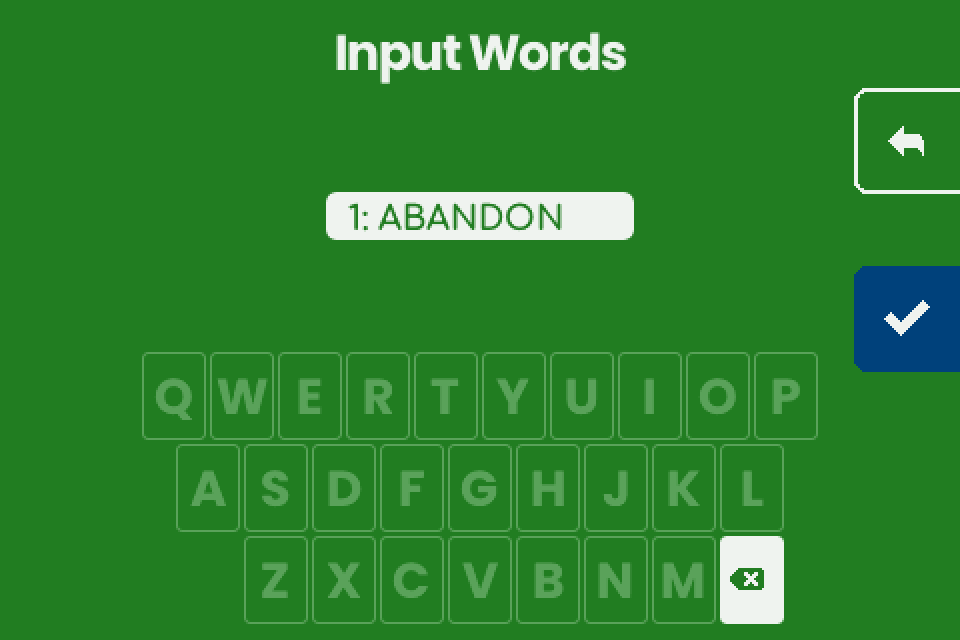 ## Check the words {#check} - Compare every word on "Engrave Seed" with your written seed, in order. - To fix a word: - Tap the word. - Tap the pencil (middle right). "Input Words" opens at that word. - Enter the word as in [Type the words](#type). - Tap the checkmark (bottom right), shown once every slot is filled. "Engrave Plate" opens, or "Invalid Seed" ([fix](#troubleshooting)). 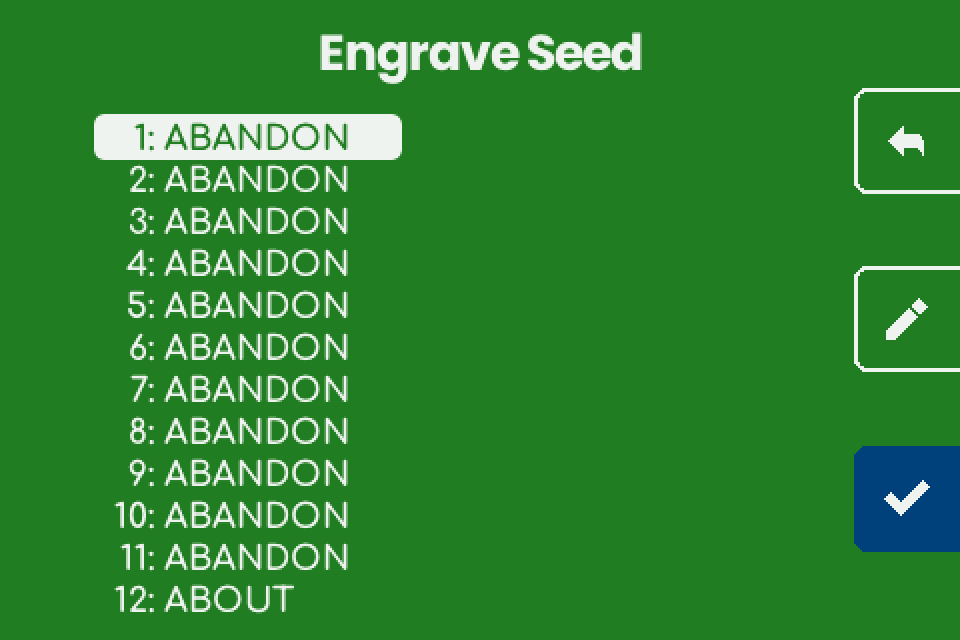 ## Engrave the plate {#engrave} - On "Engrave Plate", insert a blank plate and close the lock. - Put on hearing protection. - Hold the hammer button (bottom right) for 1 second. Stop, resume and errors: [Load a plate and engrave](/doc/manual/power-and-first-start#plate). - At "Engraving completed successfully.", tap the right arrow.  ## What the machine shows {#machine} | Screen | Shows | Back arrow (top right) | | --- | --- | --- | | "Input Seed" | "Choose number of words", rows **12 WORDS** and **24 WORDS**. | The start screen. | | "Input Words" | Word number and typed letters above a keyboard; backspace ends the bottom row. | Leaves at once and keeps the confirmed words: "Input Seed" if none, otherwise "Engrave Seed". | | "Engrave Seed" | "1: WORD", words 1 to 12 left and 13 to 24 right. An empty slot shows its number only. | "DISCARD SEED?" with "Going back will discard the seed." and "Hold button to confirm." Tap the back arrow to keep the words, or hold the trash bin (bottom right) for 1 second to drop the seed and return to the start screen. | | "Engrave Plate" | "Insert a blank plate and close the lock.", at the end "Engraving completed successfully." | Before the start: "Engrave Seed", words kept. | ## What the plate carries {#plate} One face: the master fingerprint (8 capitals, centred above the words), the numbered words in capitals and a SeedQR. No title, no passphrase. Full layout: [Seed plate](/doc/manual/titles-and-plate-layout#seed). Compare the fingerprint with the one your wallet shows for this seed with no passphrase; a match confirms the words. The 12-word test seed ("abandon" eleven times, then "about") gives 73C5DA0A.  ## Passphrases, shares and other seeds {#limits} - **Passphrase.** v1.4.3 has no passphrase screen and engraves no passphrase. Keep it in a separate backup made another way. - **Descriptor.** The seed flow never asks for one and does not compare the seed with one (unverified). For multisig, engrave each seed on its own plate and the descriptor on a free face: [What fits on a plate, and multisig without sharding](/doc/manual/multisig-and-fit). - **Electrum seeds** are refused with "Electrum seeds are not supported." only when the words fail the BIP39 checksum. One whose words pass is engraved as BIP39 with no warning, so know your seed type first. - **Other seeds and shares.** LND seeds (aezeed) are not BIP39 seeds and are not supported. 15, 18 and 21-word seeds, codex32 shares and SLIP-39 shares cannot be typed, and SLIP-39 is switched off. The machine does not split or combine seeds. A share is as secret as a seed: never send one over NFC to get around the menu ([Shares](/doc/manual/capability-sheet#shares)). ## If it does not work {#troubleshooting} | Symptom | Cause | Fix | | --- | --- | --- | | A letter you need is dim. | No BIP39 word continues the typed letters with it: an earlier letter is wrong, or the word is not on the English list. | Backspace and compare with your written seed. | | The screen stops responding after the first key. | X pressed as the first letter; the firmware stopped. | Disconnect and reconnect the power, then type the seed again. | | "Invalid Seed" / "The seed phrase is invalid." / "Check the words and try again." | The words fail the BIP39 checksum: a wrong word, two words swapped, a wrong last word, or never a BIP39 seed. | Tap the checkmark to return to "Engrave Seed". Compare each word in order and fix it with the pencil. | | "Invalid Seed" / "Electrum seeds are not supported." | An Electrum seed. | Stock firmware cannot engrave it as a seed. Keep it in another backup. | | The fingerprint on the plate differs from the wallet. | A passphrase in the wallet, a different word, or not a BIP39 seed (an Electrum seed that passed the BIP39 checksum never matches its Electrum wallet). | Compare the words first. If every word matches and the wallet uses BIP39, the difference is the passphrase. | | The job stops mid-plate and the start screen returns. | The charger reset itself (most likely) and the machine restarted. The words are gone. | Use another supply, type the seed again and restart the job: [Retry and restart](/doc/manual/troubleshooting#retry). | | An animation covers the screen. | Screen saver, after 3 minutes without a touch. | Touch the screen. The first touch presses nothing. |  --- # Titles and what is engraved on a plate **Draft, not yet verified on hardware.** Stock firmware v1.4.3 engraves the layouts below on seed and descriptor plates. A wallet's title appears on the screen only, and the fingerprints tell the plates of one wallet apart.Seed words are typed on the machine only and never pass through a phone, a computer or a chat assistant. A descriptor is not a secret, but it reveals every address of the wallet.
## What you need {#requirements} - A SeedHammer II on stock firmware v1.4.3. - To check a plate: the wallet's descriptor or master fingerprints as your wallet app shows them. - To see a title on the machine: a wallet export that carries the wallet name ([Titles](#titles)). ## On every plate {#common} - One job engraves one face of one 85 x 85 mm plate, with 3 mm free along every edge. - No date, plate number, firmware version or wallet name ([Titles](#titles)). - No plate preview in v1.4.3. The plate itself is the first view of the layout. ## Passphrases and other text {#passphrase} - No passphrase or free text: "Input Words" takes BIP39 words only. Free text is planned for later firmware. - Keep a passphrase in a separate backup made another way. ## Seed plate {#seed} A seed plate has no derivation path or script type; those belong to the descriptor. After the checkmark on "Engrave Seed", the machine plans this layout: - **Master fingerprint.** 8 capitals, 2.0 mm tall (unverified), centred above the words: `73C5DA0A` for the test seed `abandon` x 11, `about`. - **Words.** The word number and the whole word in capitals, for example `1 ABANDON`. 2.7 mm tall on a 4.1 mm line (unverified). - **SeedQR (unverified).** Standard (4 digits per word), not compact, error correction M. | | 12 words | 24 words | | --- | --- | --- | | Left column | words 1 to 12 | words 1 to 16 | | Right column | the SeedQR, 25 x 25 modules, 22.5 mm wide | words 17 to 20 above the SeedQR (29 x 29 modules, 26.1 mm), words 21 to 24 below | | Planned engraving time, without homing | 14 min 35 s | 23 min 42 s |   ## Descriptor plate {#descriptor} - **Layouts.** "Engrave" lists those that fit: "TEXT + QR", "TEXT ONLY", "QR ONLY" ([fit](/doc/manual/multisig-and-fit#fit)). - **Text.** The rebuilt descriptor from the top left, wrapped edge to edge, case kept; lines near the top and bottom edges are shortened at the corners. 3.8 mm lines, capitals about 2.2 mm, 2.3 mm per character (unverified). - **Keys.** Each key keeps its fingerprint and path in brackets, and the text ends in the machine's checksum. A key with the placeholder fingerprint `00000000` is engraved without brackets, so its path is lost too. - **QR.** The descriptor without checksum, error correction L; centred alone, or top right with the text. - **Differences.** `h` for `'` and no child path: [Why the plate differs](/doc/manual/multisig-and-fit#differences). No title: [Titles](#titles). - **Bare keys and shares.** Send a descriptor with key origin, never a bare key ([why](/doc/manual/capability-sheet#formats)). A codex32 share is secret: never send one over NFC ([Shares](/doc/manual/capability-sheet#shares)). | Example wallet | Layout | Space used | Planned time | | --- | --- | --- | --- | | 2-of-3 native segwit, keys with origins, `/<0;1>/*` | TEXT ONLY | top 56 mm of the plate | 10 min 58 s | | the same 2-of-3 | QR ONLY | 65.7 mm square, centred | 39 min 27 s | | single-sig native segwit, key with origin, `/0/*` | TEXT + QR | top 54 mm, QR 40.5 mm | 18 min 41 s |  ## Titles: shown, not engraved {#titles} | Export | Title comes from | | --- | --- | | JSON with `"label"` and `"descriptor"`: Specter Desktop **Copy Wallet Data** or **Save Wallet File**; Sparrow's **Specter Desktop** export | the `label` field | | Coldcard-format multisig text: in Sparrow, **Export File...** in the **Coldcard Multisig**, **Keystone Multisig**, **Passport Multisig** or **BlueWallet Vault Multisig** pane (**Show...** gives a QR code, not text); Specter's **Save ColdCard file**; BlueWallet's **Export Coordination Setup** | the `Name:` line | - A title is the wallet name an export carries, and only these two kinds carry one. A plain descriptor never does, whichever app it comes from. - Coldcard-format text without a `Name:` line is refused with "Unknown format". Sparrow and Specter shorten the `Name:` to 20 characters in their Coldcard-format exports. - Sparrow 2.5 and later add `?bh=` or `?gl=` ("Unknown format"): [remove it](/doc/manual/nfc-tools-transfer#prepare). Its Coldcard-format exports have no suffix and no child path ([why](/doc/manual/multisig-and-fit#differences)). - "Engrave Descriptor" shows the whole title, wrapped, case kept, no 18-character limit (unverified). - No plate carries the title (unverified). The first SeedHammer engraved a title of up to 18 characters; SeedHammer II firmware from v1.4.1 on engraves none.   ## Tell the plates of one wallet apart {#labelling} - Each seed plate carries its master fingerprint in capitals, for example `73C5DA0A`. - The descriptor text carries each cosigner's fingerprint in lower case, in brackets before its key: `[73c5da0a/48h/0h/0h/2h]`. A 2-of-3 made from three public test seeds holds `73c5da0a`, `3f635a63` and `28645006`. - Match each seed plate to one of these; capitals and lower case are the same value. A seed used with a passphrase does not match: its plate shows the fingerprint without the passphrase. - On a "QR ONLY" plate the fingerprints are in the QR only; a bare or `00000000` key, or an older QR, has none. ## If it does not work {#troubleshooting} | Symptom | Cause | Fix | | --- | --- | --- | | No "Title" line on "Engrave Descriptor" | No name in the export. | Send an export from the [Titles](#titles) table. | | The wallet name is not on the plate | Titles are shown only. | Keep a note of the name. Tell plates apart by their [fingerprints](#labelling). | | "Unknown format" with Coldcard-format text | No `Name:` line, or `Format: BIP45` from Specter's **Save ColdCard file** for legacy P2SH. | For legacy P2SH, send **Copy Wallet Data**. [All causes](/doc/manual/troubleshooting#nfc). | | "Unknown format" with a Sparrow export | A `?bh=` or `?gl=` suffix. | [Remove it](/doc/manual/nfc-tools-transfer#prepare). | | The seed plate's fingerprint differs from the wallet | The wallet uses a passphrase, or a word differs. | With a passphrase, expected: the plate shows the fingerprint without it ([fingerprints](#labelling)). | | The checksum or keys on the plate differ from what I sent | The plate carries the rebuilt descriptor ([Text](#descriptor)). | See [why](/doc/manual/multisig-and-fit#differences). | | No `/0/*` or `/<0;1>/*` on the plate | The export had none. | Send a plain descriptor with `/<0;1>/*` (no title). | | A QR from older firmware has no fingerprints | v1.4.1 and v1.4.2 left out the master fingerprints and the origin paths before each key. | [Older plates](/doc/manual/recovery-from-plates#old-plates). | --- # Troubleshooting: errors and symptoms **Draft, not yet verified on hardware.** What each message and fault on the SeedHammer II means on stock firmware v1.4.3, and how to clear it.Seed words are typed on the machine only. Seed words and codex32 shares never pass through a phone, a computer or a chat assistant, and that includes asking for help. A descriptor is not a secret, but it reveals every address of the wallet.
## First checks {#first-checks} - Read the firmware line at the bottom right of the start screen, "Backup Wallet". The fixes below apply to "Firmware: v1.4.3". - A v2.x beta is older than v1.4.3: upgrade first, see [Firmware upgrade](/doc/manual/firmware-upgrade#version). - Note the exact text on the screen before you tap anything. NFC status messages show for about one second.  ## Power and start-up {#power} The machine starts only on a USB PD offer of 20 V to 28 V at 3 A or more; buy a supply that offers 20 V or 28 V at 5 A, see [Choose the power supply](/doc/manual/power-and-first-start#power). | What you see | Cause | What to do | | --- | --- | --- | | Black screen, or only the backlight | No PD offer of 20 V to 28 V at 3 A or more, so the machine is in upgrade mode (a computer sees a USB drive) | Connect a supply that offers 20 V or 28 V at 5 A, with the cable from the box | | Dark screen right after a firmware upgrade | Normal on a computer port without 20 V PD | Connect the power supply | | Restarts over and over at power-up | The charger's protection trips (Apple 140 W, unverified) | Try another charger | | Stops mid-job and the start screen returns | The charger reset itself and the machine restarted | Restart the job, see [Retry and restart](#retry) | | "Engraving failed." with "Error: engraver: not enough power available" (as the job switches the head on) or "Error: stepper: power loss or short circuit" (during the job) | The fault signal of the engraving head's driver: the supply, or a short circuit, for example in the head's wiring | Follow the steps below | For either power error: - Hold the hammer button to retry once. - If it fails again, unplug the power. - Push the engraving head cable and the 2-wire cable firmly into their plugs. - Connect a supply that offers 20 V or 28 V at 5 A. - Power up and start the job again. A seed has to be typed again. Full detail per row: [Power supply and first start](/doc/manual/power-and-first-start#troubleshooting). ## Sending a descriptor over NFC {#nfc} | What you see | Cause | What to do | | --- | --- | --- | | Nothing happens on the machine | NFC is on only while the start screen, "Backup Wallet", is shown | Go back to it, lay the phone's antenna area flat over the panel right of the display, remove a thick case, and on Android switch NFC on. See [Send a descriptor with NFC Tools](/doc/manual/nfc-tools-transfer) | | The phone says the write worked, the machine shows nothing | The machine reads Text and URI records only; a Data, MIME or Smart Poster record, or UTF-16 text, is skipped while the phone reports success | Use one **Text** record | | NFC Tools reports an error at the end of the write | Harmless when the machine shows "Engrave Descriptor" | See [NFC Tools reports an error](/doc/manual/nfc-tools-transfer#troubleshooting) | | The machine shows a different wallet from the one you sent | An older record still in the NFC Tools list (unverified) | Keep exactly one Text record | | A Coldcard gives "Scan error", "Unknown format" or nothing | The Mk4 antenna is weak | Remove the sleeve and hold the Coldcard to the right of the display. Which export to send: [Coldcard](/doc/manual/descriptor-coldcard) | | A tag, a card or a desktop NFC writer does not work | The machine reads only some tag types; desktop writers unverified | See [NFC tags, cards and desktop writers](/doc/manual/capability-sheet#tags) | "Unknown format" flashes on the start screen when the text matches none of the formats the machine reads. | Cause | Fix | | --- | --- | | A line break or space before or after a one-line descriptor or key | Delete it in NFC Tools. Do not retype any characters | | A **URL / URI** record: it arrives with `https://` in front | Use a **Text** record | | `?bh=` or `?gl=` near the end (Sparrow 2.5 and later, after a confirmed payment or a gap-limit change) | Delete everything from `?` to the end, see [Prepare the text](/doc/manual/nfc-tools-transfer#prepare) | | Coldcard-format text without a `Name:` line, with Windows line ends (CRLF), with indented lines, or with two different `Derivation:` lines | Keep the `Name:` line and plain line ends; for mixed paths send a plain descriptor, where each key carries its own path | | Coldcard-format text with `Format: P2SH-P2WSH` (a wrapped BlueWallet vault, a P2SH-P2WSH Coldcard export) | Send a plain descriptor string | | Receive and change descriptors on two lines | Send one line: the multipath `/<0;1>/*` descriptor, or the first line alone | | A BSMS record (first line `BSMS 1.0`) | If its second line is a full descriptor, send only that line. A second line ending in `/**` is a template the machine cannot read: export a plain descriptor | | A script the machine does not engrave: unsorted `multi`, miniscript (Liana wallets, for example), taproot multisig, taproot script paths | None on v1.4.3, see [Scripts](/doc/manual/capability-sheet#scripts) | | A bare key with a `ypub`, `Ypub`, `Zpub`, `upub` or `vpub` prefix | Send a descriptor with key origin | | Seed words with a failed BIP39 checksum, which includes most Electrum seeds | Type seed words on the machine, see [Entering a seed](#seed) |  | What you see | Cause | What to do | | --- | --- | --- | | "Scan error" flashes on the start screen | The transfer broke off, or the text was 8192 bytes or longer, which only unusual sources send (a phone cannot send that much) | Write again. After one oversized payload every later scan fails until you leave the start screen (unverified): tap the checkmark (bottom right), tap the back arrow (top right) on "Input Seed", and write again | | "Content too large" | Never shown on v1.4.3: the text exists in the firmware, but nothing triggers it | Note the firmware line and report it | | "Too Large" with "The descriptor cannot fit any plate size." | None of the three layouts fits the 85 x 85 mm plate; removing spaces, the checksum or JSON keys changes nothing | Tap the checkmark to return to "Engrave Descriptor", then see [What fits on a plate](/doc/manual/multisig-and-fit#fit) | | "TEXT + QR" is not offered | The "Engrave" screen lists only the layouts that fit; a multisig with key origins gets "TEXT ONLY" and "QR ONLY" | See [What fits on a plate](/doc/manual/multisig-and-fit#fit) | | The machine freezes after the checkmark on a descriptor | An out-of-memory fault on v2.0.4-beta, fixed in the release of 2026-01-31 | Upgrade a v2.x beta | | "Engrave Descriptor" shows "Legacy (P2PKH)" for a segwit wallet | A bare `xpub` | Send a full descriptor with key origin, see [Bare keys](/doc/manual/capability-sheet#formats) | | No "Title" line, or the title is not on the plate | A title comes only from a JSON `label` or a Coldcard-format `Name:` line, and it is shown, not engraved | See [Titles](/doc/manual/titles-and-plate-layout#titles) |   ## Entering a seed {#seed} | What you see | Cause | What to do | | --- | --- | --- | | "Invalid Seed": "The seed phrase is invalid. Check the words and try again." | At least one word is wrong or out of order: the phrase fails the BIP39 checksum | Tap the checkmark (bottom right) to return to "Engrave Seed", tap the word, tap the pencil (middle right) and type it again; see [Check the words](/doc/manual/seed-entry#check) | | "Invalid Seed" after the last word of an LND aezeed phrase (message unverified) | aezeed is a different scheme; its 24 words come from the BIP39 word list, so every word can be typed | None: the machine engraves BIP39 seeds only | | "Invalid Seed": "Electrum seeds are not supported." | An Electrum seed, a different format from BIP39 | None: the machine engraves BIP39 seeds only | | Letters go dim and a word cannot be typed | After each key the keyboard dims every letter that cannot continue a BIP39 word | Check the word: only BIP39 words can be entered | | The machine freezes after the first key on "Input Words", or after the first key after the pencil | X as the first letter of a word stops the v1.4.3 firmware (freeze or restart unverified); no BIP39 word starts with X | Unplug the power and start again. The words are gone: the firmware keeps nothing after power-off | | The fingerprint on the seed plate does not match your wallet | The machine engraves the fingerprint for an empty passphrase; v1.4.3 has no passphrase screen | None: a wallet with a passphrase shows a different fingerprint | | The back arrow on "Engrave Seed" opens "DISCARD SEED?" | Going back discards the words typed so far | Tap the back arrow to cancel, or hold the trash button for one second to discard | About 1 in 16 12-word Electrum seeds also pass the BIP39 checksum; the machine takes such a seed as BIP39 and engraves it without any message.  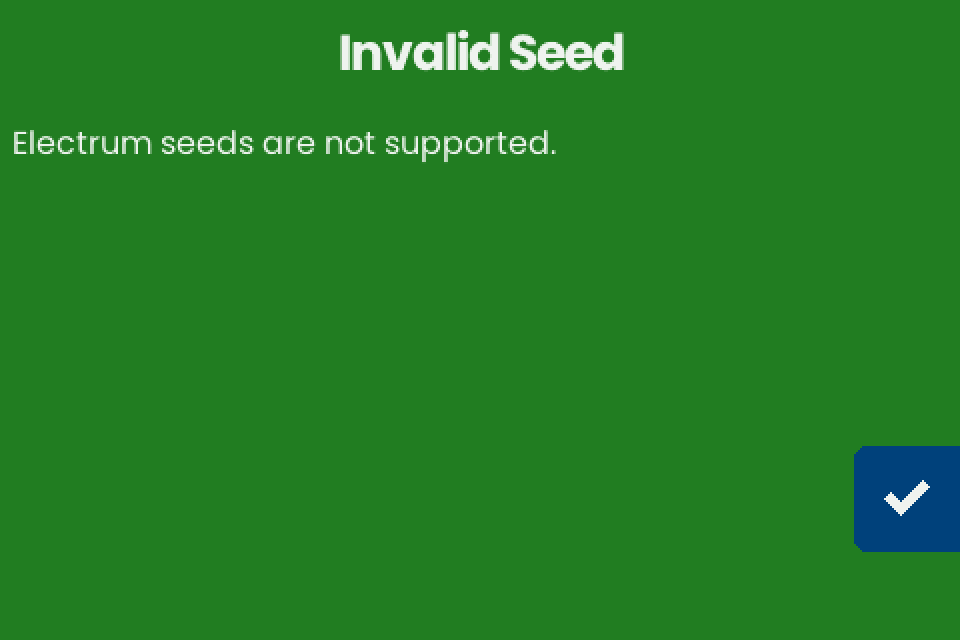 ## Engraving {#engraving} | Error text after "Error: " | Cause | What to do | | --- | --- | --- | | "stepper: homing timed out" | An axis did not reach its stop when the job started, for example because of a loose pulley: the motor turns, the axis does not | Retry once, then tighten the [pulleys](/doc/manual/engraving-quality#pulleys) | | "stepper: x-axis blocked" or "stepper: y-axis blocked" | The motor driver on that axis reported a stall (trigger unverified) | Remove anything in the head's path and retry. If it fails again, unplug the power and move the head by hand along both axes | | "mjolnir2: buffer underrun", or "buffer overrun" (unverified) | Harmless (unverified) | Retry, see [Retry and restart](#retry) | | "engraver: not enough power available" or "stepper: power loss or short circuit" | The fault signal of the engraving head's driver, see [Power](#power) | Retry, then reseat the cables and change the supply | | "engraver unavailable" | No engraver was set up at power-up (hardware cause unverified) | Start with the [power supply](/doc/manual/power-and-first-start#troubleshooting) | 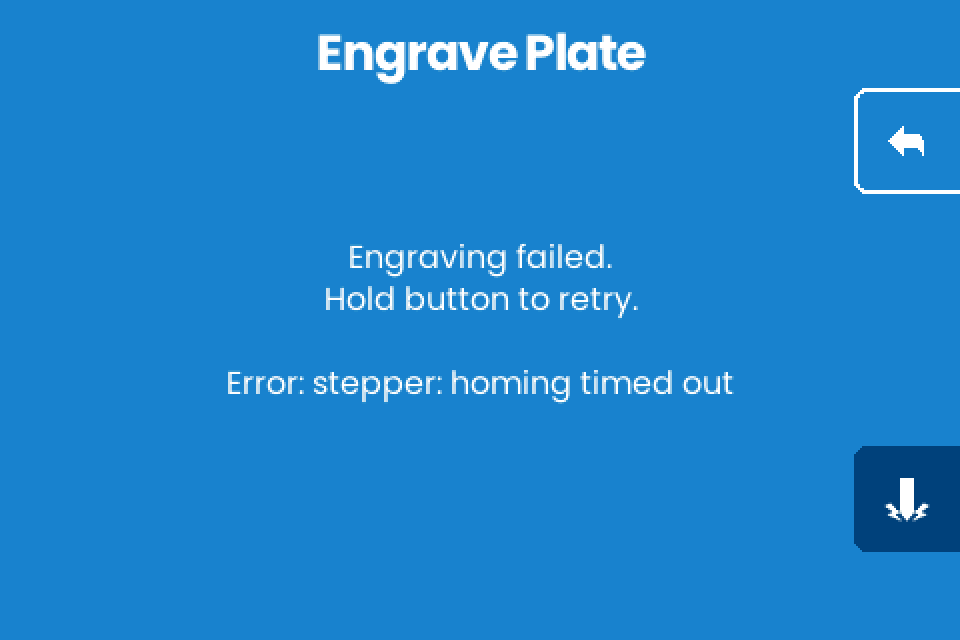 Homing also runs at power-up; a failure there shows no message, and the error appears when a job starts (unverified). | What you see | Cause | What to do | | --- | --- | --- | | The hammer button does nothing | It needs a one-second hold; releasing early cancels | Hold it until the ring fills | | The head moves but stops striking part way, often on the right side or in the QR | A loose head cable, a sticking needle or a weak supply | See [Needle and cables](/doc/manual/engraving-quality#needle) | | Wobbly or wavy text | A loose set screw on the Y-axis holder, or a slack belt | See [Belts and Y-axis holder](/doc/manual/engraving-quality#belts) | | The last words on the plate fade | Play in the X axis, a loose set screw in the brass nut, or a loose plate clamp | See [Brass nuts](/doc/manual/engraving-quality#brass-nut) | | The head passes over the orange frame at power-up | It drives to its homing corner, then to the plate origin; passing over the frame on the way is normal (unverified) | None | | The head scrapes the orange frame | A loose pulley | See [Pulleys](/doc/manual/engraving-quality#pulleys) | | Progress stays at 0% and nothing moves | An out-of-memory fault in early beta firmware with 24-word seeds, fixed in the release of 2026-01-31; v1.4.3 shows progress as a countdown ("M:SS") | Upgrade a v2.x beta | | The back arrow does nothing on "Engrave Plate" after a codex32 share | A share sent over NFC goes straight to "Engrave Plate", with no way back (unverified) | Finish the engraving or unplug the machine. See [Shares](/doc/manual/capability-sheet#shares) | | You want to test a job without engraving a plate | v1.4.3 has no dry-run mode | See [Test a job without engraving a plate](/doc/manual/engraving-quality#dry-run) | ### Retry, resume and restart {#retry} | Situation | What to do | Result | | --- | --- | --- | | "Engraving paused." with "Hold button to resume.", after a tap on the left arrow | Hold the hammer button | The job continues where it stopped | | Leaving a paused job | Tap the back arrow | The stop point is dropped; the next start engraves the whole plate from the beginning | | "Engraving failed." with "Hold button to retry." | Hold the hammer button | The head homes and the job continues from the stop point (unverified) | | A restart after a power loss or after leaving a paused job, with a partly engraved plate | Start the job again; after a power loss a seed has to be typed again. The same plate or a blank plate (unverified) | Whether the restarted job lands on the first strikes (unverified) | ## Screen and touch {#screen} | What you see | Cause | What to do | | --- | --- | --- | | The screen is garbled or looks like a screen saver, for example after a firmware upgrade | The flat cable between the board and the display is loose | Reseat it, steps below | | An animation covers the screen and the first touch does nothing | The screen saver starts after three minutes without input; the first touch only wakes the screen | Touch again to act | To reseat the display cable: - Unplug the power. - Open the two black locks of the display connector. - Push the cable fully in. - Press the locks closed.  ## If it does not work {#troubleshooting} When you ask for help, give these details: - The firmware and hardware lines from the start screen. - The exact text on the machine. - The power supply, with its voltage and port. - For NFC: the phone, the app and its version. - In place of the descriptor, the "Type" and "Script" lines from "Engrave Descriptor".